 日本語
日本語





AmneziaWG
Keywords
| Keyword | Definition |
|---|---|
| 🛡️ AmneziaWG | A fork of WireGuard that randomizes packet headers, sizes, and timing to resist Deep Packet Inspection while keeping the same audited cryptography. It is the protocol that runs on your server. |
| 🚀 AmneziaWG 2.0 | The current major version that uses dynamic header ranges (instead of fixed values), adds data-level padding (S4), and supports Custom Protocol Signature decoy packets for stronger DPI evasion. |
| 🔍 Deep Packet Inspection (DPI) | A network filtering technique used by ISPs and governments to identify and block VPN traffic by analyzing packet headers, sizes, and handshake patterns. AmneziaWG is specifically designed to defeat it. |
| ⚡ WireGuard | A fast, modern VPN protocol with a small codebase and kernel-level performance. It is easily fingerprinted by DPI systems due to its fixed packet structure, which is what AmneziaWG was built to fix. |
| 🏠 Self-hosted VPN | A VPN you deploy and manage on your own server (typically a VPS) rather than subscribing to a commercial provider. You control the keys, config, and infrastructure. |
| 🐧 DKMS (Dynamic Kernel Module Support) | A Linux framework that automatically recompiles kernel modules when the system kernel is updated. The AmneziaWG installer uses DKMS to build the high-performance kernel module. |
| 🎭 Obfuscation | The practice of disguising VPN traffic to look like ordinary internet traffic. AmneziaWG obfuscates at the transport layer by randomizing headers, adding padding, sending decoy packets, and firing junk packets. |
| 🔀 Split tunneling | A routing configuration where only specific traffic (e.g., blocked sites) goes through the VPN while the rest uses your direct connection. Useful in countries with partial censorship. |
| 🖥️ KVM vs LXC | KVM is full virtualization with a dedicated kernel, required for loading custom kernel modules like AmneziaWG. LXC is container-based virtualization that shares the host kernel and cannot load custom modules. |
| 🎪 CPS (Custom Protocol Signature) | An AmneziaWG 2.0 feature that sends decoy packets mimicking other protocols (QUIC, DNS, SIP) before the real handshake, fooling DPI systems into classifying the traffic as normal. |
Self-Host an AmneziaWG VPN Server — Complete Guide

AmneziaWG is a protocol designed to solve a specific problem: how do you get WireGuard’s speed when the networks you’re connecting through actively try to block it? It’s a fork of WireGuard built by the Amnezia VPN team, and it does one thing that the original doesn’t — it randomizes the transport layer so Deep Packet Inspection systems can’t fingerprint it. The encryption underneath stays exactly the same. What changes is how the packets look on the wire.
The broader landscape of VPN obfuscation has been an arms race for years. Tools like Shadowsocks, VLESS+Reality, and OpenVPN with obfs4 all attempt to disguise traffic in different ways — some as proxies, some as full tunnels, some with heavy performance costs. AmneziaWG sits in a specific niche: it’s a full VPN tunnel with WireGuard-level performance and built-in DPI resistance, all in one package. And since it’s open-source, you can self-host it on your own server.
But here’s the problem that makes this necessary. You set up WireGuard. It works perfectly — fast, clean, reliable. Then one day it stops. No error message, no timeout, no connection refused. The packets just vanish. That’s what DPI blocking looks like in practice: your tunnel is still running, your config is still correct, and nothing gets through. This is the reality in Russia (where WireGuard has roughly a 12% success rate), Iran (98% packet loss), and a growing list of countries including China, Egypt, UAE, Turkey, Belarus, Uzbekistan, Kazakhstan, Myanmar, and Pakistan.

Traditional alternatives don’t fully solve this. Shadowsocks is a proxy, not a full VPN tunnel — your DNS and non-TCP traffic still leak. OpenVPN with obfs4 works but carries roughly 25% performance overhead. VLESS+Reality offers strong obfuscation but is proxy-based and complex to configure. AmneziaWG fills the gap: a complete VPN tunnel with WireGuard’s speed and DPI resistance baked in.
This guide walks you through deploying a fully functional AmneziaWG 2.0 server on any KVM VPS in under 15 minutes using a single community installer script. By the end, you’ll have a working VPN tunnel you can connect to from any device. The steps are provider-agnostic — they work on any VPS with root SSH access, whether that’s from AlexHost, AvaHost, or elsewhere. This is written for intermediate tech users who are comfortable with SSH and basic Linux commands.
One clarification before we start: AmneziaWG is the protocol. AmneziaVPN is the client app that connects to it. They’re related but distinct — like TLS is to your browser. You’ll need the app to connect, but the protocol is what runs on your server.
But before we deploy anything, you need to understand what makes AmneziaWG different from WireGuard — and why that difference matters when DPI is watching.
What Is AmneziaWG? (The Mental Model)
WireGuard is elegant by design. It has a small codebase, uses modern cryptography, and runs in the Linux kernel for near-native performance. But that elegance comes with a visibility problem: every WireGuard packet carries the same fixed header structure, the same fixed packet sizes, and the same handshake pattern. To a Deep Packet Inspection system, a WireGuard tunnel has a signature as clear as a barcode. Once a DPI box learns that signature, it can drop every packet without blocking the port or closing the connection.
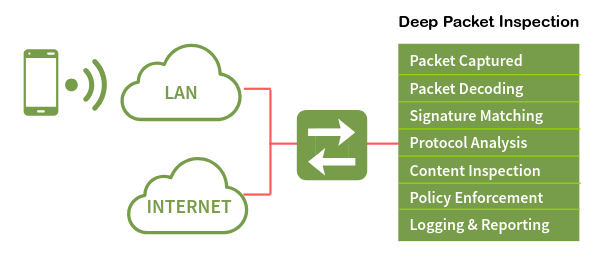
Think of it this way. WireGuard is like a courier who always wears the same uniform — fast, reliable, and efficient. But anyone watching the road learns to recognize that uniform and can stop the courier at any checkpoint. AmneziaWG is the same courier carrying the same packages, but they change uniforms at every checkpoint. Same person, same cargo, completely different appearance.
The version history matters here. AmneziaWG 1.x introduced custom headers that differed from WireGuard’s fixed values — it helped for a while, but DPI systems adapted. AmneziaWG 2.0, released in late 2025, randomizes everything: headers change per packet, padding varies per message, and decoy packets mimic other protocols before the real handshake begins. There is no universal signature to detect because every AmneziaWG 2.0 server generates its own unique parameter set. Each server speaks its own dialect.
When all obfuscation parameters are set to zero, AmneziaWG behaves identically to WireGuard — it’s fully backward compatible at the protocol level. But with parameters active (which is the default), it becomes something WireGuard cannot be: a fast VPN tunnel that DPI systems struggle to identify.
So how exactly does AmneziaWG scramble its traffic? Let’s look at the four obfuscation layers that make DPI blind — and why they add almost no speed cost.
How AmneziaWG Hides From DPI (Without Losing Speed)
AmneziaWG 2.0 uses four layered obfuscation techniques that work together. Each one targets a different way DPI systems identify VPN traffic. Together, they make every server’s traffic look unique.
Dynamic Headers (H1–H4)
WireGuard uses fixed 32-bit message type identifiers:
- 1 — for initiation
- 2 — for response
- 3 — for cookie reply
- 4 — for data
A DPI box scanning traffic just looks for these values. AmneziaWG 2.0 replaces each fixed value with a random number drawn from a configured range. The initiation header (H1) might be any value between 234567 and 345678. The response header (H2) might be between 3456789 and 4567890. These ranges never overlap — the protocol still needs to distinguish packet types internally — but to an outside observer, there’s no single header value to latch onto. Every packet looks different from the last.
Random Padding (S1–S4)
WireGuard’s initiation packet is always exactly 148 bytes. Its response is always exactly 92 bytes. These fixed sizes are another fingerprint. AmneziaWG adds random padding to each packet type: the initiation becomes 148+S1 bytes, the response becomes 92+S2 bytes, the cookie reply becomes 64+S3 bytes, and every data packet gets S4 bytes of padding. S3 and S4 are new in version 2.0 — and S4 is the most significant addition because it touches every single data packet, making session-wide traffic analysis much harder.
There’s one critical constraint: S1+56 must not equal S2. Since the original size difference between initiation and response is 56 bytes (148−92), if the padding values happened to compensate for exactly that difference, the two padded packets would end up the same size — recreating the fingerprint AmneziaWG is trying to eliminate. The installer’s parameter generator enforces this constraint automatically.
Custom Protocol Signature (I1–I5)
Before the real WireGuard handshake begins, the AmneziaWG client sends up to five decoy packets that mimic other protocols — QUIC, DNS, SIP, or custom byte patterns. The server ignores these packets entirely. It just waits for the real handshake.
- A simple configuration: Sends 128 random bytes <r 128>.
- A sophisticated configuration: Sends bytes that look like a QUIC connection initiation (<b 0xc000000001><r 64><t>), complete with a Unix timestamp.
To a DPI system watching the session start, the first packets look like normal web traffic.
Junk Packets (Jc, Jmin, Jmax)
After the decoy packets, the client fires a configurable number of junk packets — pure noise with random sizes between Jmin and Jmax. These blur the timing and size profile of the session start, making it harder for DPI systems to identify where the real handshake begins.
The Speed Question
There’s a number that’s been circulating online: AmneziaWG has 65% overhead. That figure is real, but it refers to the userspace Go implementation — not the kernel module. The community installer used in this guide builds a DKMS kernel module, and the kernel module adds less than 12% overhead total — closer to 3% in real-world benchmarks. On an uncensored network, you’d see roughly 95 Mbps through WireGuard and 92 Mbps through AmneziaWG 2.0. In a censored network, the comparison is 92 Mbps versus zero.
The following table summarizes the parameters the installer generates automatically:
| Parameter | Generated Range | Example Value |
|---|---|---|
Jc (junk packet count) | 4–8 | 6 |
Jmin (min junk size) | 40–89 | 55 |
Jmax (max junk size) | Jmin+100 to Jmin+500 | 380 |
S1 (init padding) | 15–150 | 72 |
S2 (response padding) | 15–150, S1+56≠S2 | 56 |
S3 (cookie padding) | 8–55 | 32 |
S4 (data padding) | 4–27 | 16 |
H1 (init header range) | uint32 non-overlapping | 234567-345678 |
H2 (response header range) | uint32 non-overlapping | 3456789-4567890 |
H3 (cookie header range) | uint32 non-overlapping | 56789012-67890123 |
H4 (data header range) | uint32 non-overlapping | 456789012-567890123 |
I1 (CPS packet) | <r N> format | <r 128> |
You don’t need to set any of these manually. The installer generates cryptographically random, constraint-valid values every time.
Now that you know how the obfuscation works, let’s see how AmneziaWG stacks up against the alternatives you might be considering.
AmneziaWG vs Alternatives — Quick Decision Guide
| WireGuard | AmneziaWG 2.0 | OpenVPN+obfs4 | Shadowsocks | VLESS+Reality | |
|---|---|---|---|---|---|
| DPI resistance | Low | High | Medium | Medium | Very High |
| Speed overhead | ~4% | <12% (~3% real-world) | ~25% | ~8% | ~10% |
| Full VPN tunnel | Yes | Yes | Yes | No (proxy) | No (proxy) |
| Runs in kernel | Yes | Yes (DKMS) | No | No | No |
| Setup complexity | Low | Low (with installer) | High | Medium | High |
| Transport | UDP | UDP | TCP/UDP | TCP | TCP |
The decision rules are straightforward:
- No DPI in your country? Use plain WireGuard. It’s simpler and has a larger ecosystem.
- Need maximum DPI resistance and OK with a proxy? VLESS+Reality is the strongest option for obfuscation, but it’s not a full tunnel.
- Want both speed and a full tunnel with obfuscation? AmneziaWG 2.0 is the only option that delivers WireGuard-grade performance with real DPI resistance in a complete VPN tunnel.
- Already using OpenVPN+obfs4 and it still works? No urgent need to switch, but AmneziaWG will be noticeably faster.
This article focuses on AmneziaWG because it’s the only protocol that gives you a full tunnel, kernel-level performance, and built-in obfuscation — all configured by a single script.
If AmneziaWG is the right choice for your situation, here’s exactly what you need before we start deploying.
What You’ll Need Before Starting
Before running the installer, make sure your environment meets these requirements:
| Requirement | Detail | Why |
|---|---|---|
| OS | Ubuntu 24.04 LTS (clean install). Ubuntu 25.10 is experimental. Debian 12/13 work but may needcurl pre-installed. | The installer is tested and fully supported on Ubuntu 24.04. |
| VPS specs | 1 vCore, 1 GB RAM, 25 GB storage. Any $3–5/month plan works. | The installer needs ~2 GB disk and ~1 GB RAM during the DKMS build. The running VPN uses negligible resources. |
| Virtualization | KVM (not OpenVZ, not LXC). | AmneziaWG loads a kernel module via DKMS. LXC shares the host kernel and cannot load custom modules. |
| SSH access | Root or sudo user with password/key authentication. | The installer must run as root. |
| SSH port | Default 22, or pre-opened in UFW if using a non-standard port. | If SSH isn’t on port 22 and you don’t pre-open it, the installer’s firewall setup will lock you out. |
| Client app | Amnezia VPN >= 4.8.12.7 (all platforms). | AWG 2.0 parameters are not understood by older clients. The standard WireGuard client does not support AWG at all. |
⚠️ Warning: LXC containers are not supported. If your VPS uses LXC virtualization, the DKMS kernel module build will fail. You must use KVM or bare-metal. Check with your provider if you’re unsure.
⚠️ Warning: If your SSH runs on a non-standard port (anything other than 22), you must open it in UFW before running the installer:
sudo ufw allow YOUR_PORT/tcpReplace
YOUR_PORTwith your actual SSH port. The installer enables UFW with a default-deny policy — if your SSH port isn’t allowed, you’ll be locked out immediately.
💡 Tip: Wait 5–10 minutes after creating your VPS before running the installer. Cloud-init and background initialization processes can conflict with the
apt-getcalls the installer makes.
With your VPS ready and prerequisites confirmed, let’s deploy AmneziaWG 2.0 using the community installer script — the fastest and most transparent method.
Keywords
| Keyword | Definition |
|---|---|
| 🛡️ AmneziaWG | A fork of WireGuard that randomizes packet headers, sizes, and timing to resist Deep Packet Inspection while keeping the same audited cryptography. It is the protocol that runs on your server. |
| 🚀 AmneziaWG 2.0 | The current major version that uses dynamic header ranges (instead of fixed values), adds data-level padding (S4), and supports Custom Protocol Signature decoy packets for stronger DPI evasion. |
| 🔍 Deep Packet Inspection (DPI) | A network filtering technique used by ISPs and governments to identify and block VPN traffic by analyzing packet headers, sizes, and handshake patterns. AmneziaWG is specifically designed to defeat it. |
| ⚡ WireGuard | A fast, modern VPN protocol with a small codebase and kernel-level performance. It is easily fingerprinted by DPI systems due to its fixed packet structure, which is what AmneziaWG was built to fix. |
| 🏠 Self-hosted VPN | A VPN you deploy and manage on your own server (typically a VPS) rather than subscribing to a commercial provider. You control the keys, config, and infrastructure. |
| 🐧 DKMS (Dynamic Kernel Module Support) | A Linux framework that automatically recompiles kernel modules when the system kernel is updated. The AmneziaWG installer uses DKMS to build the high-performance kernel module. |
| 🎭 Obfuscation | The practice of disguising VPN traffic to look like ordinary internet traffic. AmneziaWG obfuscates at the transport layer by randomizing headers, adding padding, sending decoy packets, and firing junk packets. |
| 🔀 Split tunneling | A routing configuration where only specific traffic (e.g., blocked sites) goes through the VPN while the rest uses your direct connection. Useful in countries with partial censorship. |
| 🖥️ KVM vs LXC | KVM is full virtualization with a dedicated kernel, required for loading custom kernel modules like AmneziaWG. LXC is container-based virtualization that shares the host kernel and cannot load custom modules. |
| 🎪 CPS (Custom Protocol Signature) | An AmneziaWG 2.0 feature that sends decoy packets mimicking other protocols (QUIC, DNS, SIP) before the real handshake, fooling DPI systems into classifying the traffic as normal. |
Self-Host an AmneziaWG VPN Server — Complete Guide
AmneziaWG is a protocol designed to solve a specific problem: how do you get WireGuard’s speed when the networks you’re connecting through actively try to block it? It’s a fork of WireGuard built by the Amnezia VPN team, and it does one thing that the original doesn’t — it randomizes the transport layer so Deep Packet Inspection systems can’t fingerprint it. The encryption underneath stays exactly the same. What changes is how the packets look on the wire.
The broader landscape of VPN obfuscation has been an arms race for years. Tools like Shadowsocks, VLESS+Reality, and OpenVPN with obfs4 all attempt to disguise traffic in different ways — some as proxies, some as full tunnels, some with heavy performance costs. AmneziaWG sits in a specific niche: it’s a full VPN tunnel with WireGuard-level performance and built-in DPI resistance, all in one package. And since it’s open-source, you can self-host it on your own server.
But here’s the problem that makes this necessary. You set up WireGuard. It works perfectly — fast, clean, reliable. Then one day it stops. No error message, no timeout, no connection refused. The packets just vanish. That’s what DPI blocking looks like in practice: your tunnel is still running, your config is still correct, and nothing gets through. This is the reality in Russia (where WireGuard has roughly a 12% success rate), Iran (98% packet loss), and a growing list of countries including China, Egypt, UAE, Turkey, Belarus, Uzbekistan, Kazakhstan, Myanmar, and Pakistan.
Traditional alternatives don’t fully solve this. Shadowsocks is a proxy, not a full VPN tunnel — your DNS and non-TCP traffic still leak. OpenVPN with obfs4 works but carries roughly 25% performance overhead. VLESS+Reality offers strong obfuscation but is proxy-based and complex to configure. AmneziaWG fills the gap: a complete VPN tunnel with WireGuard’s speed and DPI resistance baked in.
This guide walks you through deploying a fully functional AmneziaWG 2.0 server on any KVM VPS in under 15 minutes using a single community installer script. By the end, you’ll have a working VPN tunnel you can connect to from any device. The steps are provider-agnostic — they work on any VPS with root SSH access, whether that’s from AlexHost, AvaHost, or elsewhere. This is written for intermediate tech users who are comfortable with SSH and basic Linux commands.
One clarification before we start: AmneziaWG is the protocol. AmneziaVPN is the client app that connects to it. They’re related but distinct — like TLS is to your browser. You’ll need the app to connect, but the protocol is what runs on your server.
But before we deploy anything, you need to understand what makes AmneziaWG different from WireGuard — and why that difference matters when DPI is watching.
What Is AmneziaWG? (The Mental Model)
WireGuard is elegant by design. It has a small codebase, uses modern cryptography, and runs in the Linux kernel for near-native performance. But that elegance comes with a visibility problem: every WireGuard packet carries the same fixed header structure, the same fixed packet sizes, and the same handshake pattern. To a Deep Packet Inspection system, a WireGuard tunnel has a signature as clear as a barcode. Once a DPI box learns that signature, it can drop every packet without blocking the port or closing the connection.
Think of it this way. WireGuard is like a courier who always wears the same uniform — fast, reliable, and efficient. But anyone watching the road learns to recognize that uniform and can stop the courier at any checkpoint. AmneziaWG is the same courier carrying the same packages, but they change uniforms at every checkpoint. Same person, same cargo, completely different appearance.
The version history matters here. AmneziaWG 1.x introduced custom headers that differed from WireGuard’s fixed values — it helped for a while, but DPI systems adapted. AmneziaWG 2.0, released in late 2025, randomizes everything: headers change per packet, padding varies per message, and decoy packets mimic other protocols before the real handshake begins. There is no universal signature to detect because every AmneziaWG 2.0 server generates its own unique parameter set. Each server speaks its own dialect.
When all obfuscation parameters are set to zero, AmneziaWG behaves identically to WireGuard — it’s fully backward compatible at the protocol level. But with parameters active (which is the default), it becomes something WireGuard cannot be: a fast VPN tunnel that DPI systems struggle to identify.
So how exactly does AmneziaWG scramble its traffic? Let’s look at the four obfuscation layers that make DPI blind — and why they add almost no speed cost.
How AmneziaWG Hides From DPI (Without Losing Speed)
AmneziaWG 2.0 uses four layered obfuscation techniques that work together. Each one targets a different way DPI systems identify VPN traffic. Together, they make every server’s traffic look unique.
Dynamic Headers (H1–H4)
WireGuard uses fixed 32-bit message type identifiers:
- 1 — for initiation
- 2 — for response
- 3 — for cookie reply
- 4 — for data
A DPI box scanning traffic just looks for these values. AmneziaWG 2.0 replaces each fixed value with a random number drawn from a configured range. The initiation header (H1) might be any value between 234567 and 345678. The response header (H2) might be between 3456789 and 4567890. These ranges never overlap — the protocol still needs to distinguish packet types internally — but to an outside observer, there’s no single header value to latch onto. Every packet looks different from the last.
Random Padding (S1–S4)
WireGuard’s initiation packet is always exactly 148 bytes. Its response is always exactly 92 bytes. These fixed sizes are another fingerprint. AmneziaWG adds random padding to each packet type: the initiation becomes 148+S1 bytes, the response becomes 92+S2 bytes, the cookie reply becomes 64+S3 bytes, and every data packet gets S4 bytes of padding. S3 and S4 are new in version 2.0 — and S4 is the most significant addition because it touches every single data packet, making session-wide traffic analysis much harder.
There’s one critical constraint: S1+56 must not equal S2. Since the original size difference between initiation and response is 56 bytes (148−92), if the padding values happened to compensate for exactly that difference, the two padded packets would end up the same size — recreating the fingerprint AmneziaWG is trying to eliminate. The installer’s parameter generator enforces this constraint automatically.
Custom Protocol Signature (I1–I5)
Before the real WireGuard handshake begins, the AmneziaWG client sends up to five decoy packets that mimic other protocols — QUIC, DNS, SIP, or custom byte patterns. The server ignores these packets entirely. It just waits for the real handshake.
- A simple configuration: Sends 128 random bytes <r 128>.
- A sophisticated configuration: Sends bytes that look like a QUIC connection initiation (<b 0xc000000001><r 64><t>), complete with a Unix timestamp.
To a DPI system watching the session start, the first packets look like normal web traffic.
Junk Packets (Jc, Jmin, Jmax)
After the decoy packets, the client fires a configurable number of junk packets — pure noise with random sizes between Jmin and Jmax. These blur the timing and size profile of the session start, making it harder for DPI systems to identify where the real handshake begins.
The Speed Question
There’s a number that’s been circulating online: AmneziaWG has 65% overhead. That figure is real, but it refers to the userspace Go implementation — not the kernel module. The community installer used in this guide builds a DKMS kernel module, and the kernel module adds less than 12% overhead total — closer to 3% in real-world benchmarks. On an uncensored network, you’d see roughly 95 Mbps through WireGuard and 92 Mbps through AmneziaWG 2.0. In a censored network, the comparison is 92 Mbps versus zero.
The following table summarizes the parameters the installer generates automatically:
| Parameter | Generated Range | Example Value |
|---|---|---|
Jc (junk packet count) | 4–8 | 6 |
Jmin (min junk size) | 40–89 | 55 |
Jmax (max junk size) | Jmin+100 to Jmin+500 | 380 |
S1 (init padding) | 15–150 | 72 |
S2 (response padding) | 15–150, S1+56≠S2 | 56 |
S3 (cookie padding) | 8–55 | 32 |
S4 (data padding) | 4–27 | 16 |
H1 (init header range) | uint32 non-overlapping | 234567-345678 |
H2 (response header range) | uint32 non-overlapping | 3456789-4567890 |
H3 (cookie header range) | uint32 non-overlapping | 56789012-67890123 |
H4 (data header range) | uint32 non-overlapping | 456789012-567890123 |
I1 (CPS packet) | <r N> format | <r 128> |
You don’t need to set any of these manually. The installer generates cryptographically random, constraint-valid values every time.
Now that you know how the obfuscation works, let’s see how AmneziaWG stacks up against the alternatives you might be considering.
AmneziaWG vs Alternatives — Quick Decision Guide
| WireGuard | AmneziaWG 2.0 | OpenVPN+obfs4 | Shadowsocks | VLESS+Reality | |
|---|---|---|---|---|---|
| DPI resistance | Low | High | Medium | Medium | Very High |
| Speed overhead | ~4% | <12% (~3% real-world) | ~25% | ~8% | ~10% |
| Full VPN tunnel | Yes | Yes | Yes | No (proxy) | No (proxy) |
| Runs in kernel | Yes | Yes (DKMS) | No | No | No |
| Setup complexity | Low | Low (with installer) | High | Medium | High |
| Transport | UDP | UDP | TCP/UDP | TCP | TCP |
The decision rules are straightforward:
- No DPI in your country? Use plain WireGuard. It’s simpler and has a larger ecosystem.
- Need maximum DPI resistance and OK with a proxy? VLESS+Reality is the strongest option for obfuscation, but it’s not a full tunnel.
- Want both speed and a full tunnel with obfuscation? AmneziaWG 2.0 is the only option that delivers WireGuard-grade performance with real DPI resistance in a complete VPN tunnel.
- Already using OpenVPN+obfs4 and it still works? No urgent need to switch, but AmneziaWG will be noticeably faster.
This article focuses on AmneziaWG because it’s the only protocol that gives you a full tunnel, kernel-level performance, and built-in obfuscation — all configured by a single script.
If AmneziaWG is the right choice for your situation, here’s exactly what you need before we start deploying.
What You’ll Need Before Starting
Before running the installer, make sure your environment meets these requirements:
| Requirement | Detail | Why |
|---|---|---|
| OS | Ubuntu 24.04 LTS (clean install). Ubuntu 25.10 is experimental. Debian 12/13 work but may needcurl pre-installed. | The installer is tested and fully supported on Ubuntu 24.04. |
| VPS specs | 1 vCore, 1 GB RAM, 25 GB storage. Any $3–5/month plan works. | The installer needs ~2 GB disk and ~1 GB RAM during the DKMS build. The running VPN uses negligible resources. |
| Virtualization | KVM (not OpenVZ, not LXC). | AmneziaWG loads a kernel module via DKMS. LXC shares the host kernel and cannot load custom modules. |
| SSH access | Root or sudo user with password/key authentication. | The installer must run as root. |
| SSH port | Default 22, or pre-opened in UFW if using a non-standard port. | If SSH isn’t on port 22 and you don’t pre-open it, the installer’s firewall setup will lock you out. |
| Client app | Amnezia VPN >= 4.8.12.7 (all platforms). | AWG 2.0 parameters are not understood by older clients. The standard WireGuard client does not support AWG at all. |
⚠️ Warning: LXC containers are not supported. If your VPS uses LXC virtualization, the DKMS kernel module build will fail. You must use KVM or bare-metal. Check with your provider if you’re unsure.
⚠️ Warning: If your SSH runs on a non-standard port (anything other than 22), you must open it in UFW before running the installer:
sudo ufw allow YOUR_PORT/tcpReplace
YOUR_PORTwith your actual SSH port. The installer enables UFW with a default-deny policy — if your SSH port isn’t allowed, you’ll be locked out immediately.
💡 Tip: Wait 5–10 minutes after creating your VPS before running the installer. Cloud-init and background initialization processes can conflict with the
apt-getcalls the installer makes.
With your VPS ready and prerequisites confirmed, let’s deploy AmneziaWG 2.0 using the community installer script — the fastest and most transparent method.
キーワード
| キーワード | 定義 |
|---|---|
| 🛡️ AmneziaWG | WireGuardのフォークで、パケットヘッダー、サイズ、送信時間をランダム化してディープパケットインスペクション(DPI)に対抗しながら、同じ実証済みの暗号化を維持するプロトコル。サーバー上で動作するプロトコルです。 |
| 🚀 AmneziaWG 2.0 | 現在のメインバージョンで、動的ヘッダー範囲(固定値の代わりに)を使用し、データレベルのパディング(S4)を追加し、より強力なDPI回避のためにカスタムプロトコルシグネチャを持つ代替パケットをサポートしています。 |
| 🔍 Deep Packet Inspection (DPI) | ISPおよび政府機関がパケットヘッダー、サイズ、ハンドシェイクパターンを分析してVPNトラフィックを識別およびブロックするために使用するネットワークフィルタリング技術。AmneziaWGはこれに対抗するために特別に設計されています。 |
| ⚡ WireGuard | 小さなコードベースとカーネルレベルのパフォーマンスを備えた高速で最新のVPNプロトコル。固定パケット構造によってDPIシステムで容易に識別可能であり、これはAmneziaWGで対処されています。 |
| 🏠 Self-hosted VPN | 商用プロバイダーにサブスクライブするのではなく、自分のサーバー(通常はVPS)にデプロイして管理するVPN。キー、設定、インフラストラクチャを制御します。 |
| 🐧 DKMS (Dynamic Kernel Module Support) | システムカーネルが更新されたときにカーネルモジュールを自動的に再コンパイルするLinuxフレームワーク。AmneziaWGインストーラーはDKMSを使用して高性能カーネルモジュールをビルドします。 |
| 🎭 Obfuscation | VPNトラフィックを通常のインターネットトラフィックのように見せかけるためにマスキングする慣行。AmneziaWGはヘッダーをランダム化し、パディングを追加し、代替パケットを送信し、ジャンクパケットを生成することで、トランスポート層で難読化します。 |
| 🔀 Split tunneling | 特定のトラフィック(例:ブロックされたサイト)のみがVPNを通過し、その他のトラフィックが直接接続を使用するルーティング設定。部分的な検閲がある国で有用です。 |
| 🖥️ KVM vs LXC | KVMはAmneziaWGのようなカスタムカーネルモジュールをロードするために必要な専用カーネルを備えた完全仮想化です。LXCはホストの共有カーネルを使用するコンテナ仮想化で、カスタムモジュールをロードできません。 |
| 🎪 CPS (Custom Protocol Signature) | AmneziaWG 2.0の機能で、実際のハンドシェイクの前に他のプロトコル(QUIC、DNS、SIP)を模倣する代替パケットを送信し、トラフィックを通常のものとして分類することでDPIシステムを誤解させます。 |
🔄 更新(2026年7月): このガイドは元のウォークスルーをそのまま保持していますが、以下に示されているピン留めされたインストーラータグv5.8.1はもはや最新ではありません。amneziawg-installerの最新リリースはv5.18.4で、Debian 12および13のサポート、既製のARM64およびRaspberry Piカーネルモジュール、Ubuntu 25.10および26.04、カスケードモード、およびさらなるセキュリティ改善を追加しています。
今日このガイドに従う場合は、古いピン留めされたコマンドを
wget https://raw.githubusercontent.com/bivlked/amneziawg-installer/v5.18.4/install_amneziawg_en.shに置き換えるか、デプロイする前に最新リリースページで現在のタグを確認してください。
自己デプロイ型 AmneziaWG VPN サーバー — 完全ガイド

AmneziaWG は、特定の問題を解決するために設計されたプロトコルです。つまり、ネットワークが積極的にブロックしようとしている環境で、WireGuard の速度を実現するにはどうすればよいかということです。これは Amnezia VPN チームによって作成された WireGuard のフォークであり、元のプロトコルにはない機能を備えています。トランスポート層をランダム化することで、ディープパケットインスペクション (DPI) システムがそれを識別できなくなります。暗号化は全く同じままです。ネットワーク上のパケットの見た目だけが変わります。
VPN オブフスケーション (難読化) の広大な領域は、長年にわたって軍拡競争となっています。Shadowsocks、VLESS+Reality、obfs4 を使用した OpenVPN などのツールは、さまざまな方法でトラフィックを偽装しようとしています。プロキシとして機能するもの、フルトンネルとして機能するもの、高いパフォーマンスコストを伴うものもあります。AmneziaWG は特定のニッチを占めています。これは WireGuard レベルのパフォーマンスと組み込みの DPI 保護を備えた完全な VPN トンネルであり、すべてが 1 つのパッケージに含まれています。そしてオープンソースであるため、独自のサーバーにデプロイできます。
しかし、これが必要になる問題があります。WireGuard をセットアップします。完璧に動作します。高速で、クリーンで、信頼性があります。そしてある日、突然停止します。エラーメッセージもなく、タイムアウトもなく、接続拒否もありません。パケットが消えるだけです。これが実際の DPI ブロッキングの様子です。トンネルはまだ動作していて、設定はまだ正しく、何も通過していません。これは既に一部の国の現実です。

従来の代替手段はこの問題を完全には解決しません。Shadowsocks はプロキシであり、完全な VPN トンネルではありません。DNS と非 TCP トラフィックはまだリークします。obfs4 を使用した OpenVPN は機能しますが、約 25% のパフォーマンスオーバーヘッドがあります。VLESS+Reality は強力なオブフスケーションを提供しますが、プロキシベースで設定が複雑です。AmneziaWG はこのギャップを埋めます。これは WireGuard レベルのパフォーマンスと組み込みの DPI 保護を備えた完全な VPN トンネルです。
このガイドでは、単一のコミュニティインストーラースクリプトを使用して、15 分以内に任意の KVM VPS 上に完全に機能する AmneziaWG 2.0 サーバーをデプロイする手順を説明します。最後には、任意のデバイスから接続できる動作する VPN トンネルが完成します。手順はプロバイダーに依存しません。AvaHost または他のプロバイダーから提供されたものであっても、SSH アクセスと root 権限を持つ任意の VPS で機能します。これは SSH と基本的な Linux コマンドを使用することに慣れている、中級レベルの技術スキルを持つユーザーを対象としています。
始める前に、1 つの説明があります。AmneziaWG はプロトコルです。AmneziaVPN はクライアントアプリケーションであり、それに接続します。これらは関連していますが異なります。ブラウザの TLS のようなものです。接続するにはアプリケーションが必要ですが、プロトコルはサーバーで実行されるものです。
しかし、何かをデプロイする前に、AmneziaWG を WireGuard と異なるものにしているもの、そして DPI があなたを監視しているときにその違いが重要である理由を理解する必要があります。
AmneziaWGとは?(メンタルモデル)
WireGuardはその設計の優雅さで知られています。コードベースが小さく、最新の暗号化を使用し、Linuxカーネルで実行されるため、ほぼネイティブのパフォーマンスを実現します。しかし、この優雅さには可視性の問題があります。すべてのWireGuardパケットは同じ固定ヘッダー構造、同じ固定パケットサイズ、同じハンドシェイクパターンを持っています。ディープパケットインスペクション(DPI)システムにとって、WireGuardトンネルはバーコードのように明確なシグネチャを持っています。DPIデバイスがこのシグネチャを学習すると、ポートをブロックしたり接続を閉じたりすることなく、すべてのパケットをドロップできます。

AmneziaWGはAmnezia VPNチームによって作成されたWireGuard-Goのフォークです。WireGuardのアーキテクチャの単純性を継承しています。同じCurve25519鍵交換、同じChaCha20-Poly1305暗号化、同じNoise IKハンドシェイクです。すべての暗号化は変わらず、検証済みです。AmneziaWGが変更するのはトランスポート層です。パケットヘッダー、パケットサイズ、タイミングパターンです。
このように考えてください。WireGuardは常に同じ制服を着ている配達員のようなものです。高速で信頼性があり、効率的です。しかし、道路を見ている誰もがその制服を認識することを学び、すべてのチェックポイントで配達員を止めることができます。AmneziaWGは同じパッケージを運ぶ同じ配達員ですが、すべてのチェックポイントで制服を変えます。同じ人物、同じ荷物、まったく異なる外観です。
バージョン履歴は重要です。AmneziaWG 1.xはWireGuardの固定値と異なるカスタムヘッダーを導入しました。これはしばらくの間役に立ちましたが、DPIシステムは適応しました。2025年後半にリリースされたAmneziaWG 2.0は、すべてをランダム化します。ヘッダーはパケットごとに変わり、パディングはメッセージごとに異なり、代替パケットは実際のハンドシェイクの前に他のプロトコルを模倣します。各AmneziaWG 2.0サーバーは独自の一意のパラメータセットを生成するため、検出のための普遍的なシグネチャはありません。各サーバーは独自の方言を話します。
すべての難読化パラメータがゼロに設定されている場合、AmneziaWGはWireGuardと同じように動作します。プロトコルレベルで完全に後方互換性があります。しかし、アクティブなパラメータ(デフォルト設定)を使用すると、WireGuardが実現できないものになります。DPIシステムが識別するのに苦労する高速VPNトンネルです。
では、AmneziaWGはトラフィックをどのように正確に暗号化するのでしょうか?DPIを盲目にする4つのレベルの難読化と、それらが
AmneziaWG が DPI から隠れる仕組み(速度低下なし)
AmneziaWG 2.0 は、連携して機能する 4 つのレベルの難読化を使用します。各レベルは、DPI システムが VPN トラフィックを識別する異なる方法をターゲットにしています。これらが組み合わさることで、各サーバーのトラフィックが一意になります。
動的ヘッダー(H1–H4)
WireGuard は固定の 32 ビット メッセージタイプ識別子を使用します:
- 1 — 初期化用
- 2 — レスポンス用
- 3 — クッキー付きレスポンス用
- 4 — データ用
DPI デバイスがトラフィックをスキャンする際、これらの値を単純に探します。AmneziaWG 2.0 は、各固定値を指定範囲から選択されたランダムな数値に置き換えます。初期化ヘッダー(H1)は 234567 から 345678 の任意の値になります。レスポンスヘッダー(H2)は 3456789 から 4567890 の範囲になります。これらの範囲は重複しません。プロトコルは内部的にパケットタイプを区別する必要があるためです。ただし、外部の観察者にとっては、固定されたヘッダー値がありません。各パケットは前のパケットと異なります。
ランダムパディング(S1–S4)
WireGuard の初期化パケットは常にちょうど 148 バイトです。そのレスポンスは常にちょうど 92 バイトです。これらの固定サイズは別のフィンガープリントです。AmneziaWG は各パケットタイプにランダムパディングを追加します:初期化は 148+S1 バイトになり、レスポンスは 92+S2 バイトになり、クッキー付きレスポンスは 64+S3 バイトになり、各データパケットは S4 バイトのパディングを受け取ります。S3 と S4 はバージョン 2.0 で新しく追加されました。S4 は最も重要な追加機能です。すべてのデータパケットに影響を与えるため、セッションレベルのトラフィック分析がはるかに難しくなります。
1 つの重要な制約があります:S1+56 は S2 と等しくてはいけません。初期化とレスポンスの元のサイズ差が 56 バイト(148−92)であるため、パディング値がこの差をちょうど補正すると、2 つのパディング済みパケットが同じサイズになり、AmneziaWG が排除しようとしているフィンガープリントが再現されます。インストーラーのパラメータジェネレータは自動的にこの制約を確保します。
カスタムプロトコルシグネチャ(I1–I5)
実際のハンドシェイクが始まる前に、AmneziaWG クライアントは、他のプロトコル(QUIC、DNS、SIP、またはカスタムバイトパターン)を模倣する最大 5 つの代替パケットを送信します。サーバーはこれらのパケットを完全に無視します。実際のハンドシェイクを待つだけです。
- シンプル設定: 128 ランダムバイト <r 128> を送信します。
- 複雑な設定: QUIC 接続を開始しているように見えるバイト(<b 0xc000000001><r 64><t>)を Unix タイムスタンプ付きで送信します。
DPI システムがセッションの開始を観察する場合、最初のパケットは通常の Web トラフィックのように見えます。
ジャンクパケット(Jc、Jmin、Jmax)
代替パケットの後、クライアントはカスタマイズ可能な数のジャンクパケット(Jmin から Jmax までのランダムサイズの純粋なノイズ)を送信します。これらのパケットはセッション開始のタイミングとサイズプロファイルをぼかし、DPI システムが実際のハンドシェイクの開始位置を特定することを難しくします。
速度に関する質問
インターネット上に流通している数字があります:AmneziaWG のオーバーヘッドは 65% です。この数字は実在しますが、ユーザースペースの Go 実装を指しています。カーネルモジュールではありません。このガイドで使用されているコミュニティインストーラーは DKMS カーネルモジュールをビルドし、カーネルモジュールは全体で 12% 未満のオーバーヘッドを追加します。実際のテストではより 3% に近いです。検閲されていないネットワークでは、WireGuard を通じて約 95 Mbps、AmneziaWG 2.0 を通じて 92 Mbps が表示されます。検閲されたネットワークでは、比較は 92 Mbps 対ゼロです。
次の表は、インストーラーが自動的に生成するパラメータをまとめています:
| パラメータ | 生成範囲 | 例値 |
|---|---|---|
| Jc(ジャンクパケット数) | 4–8 | 6 |
| Jmin(最小ジャンクサイズ) | 40–89 | 55 |
| Jmax(最大ジャンクサイズ) | Jmin+100 から Jmin+500 | 380 |
| S1(初期化パディング) | 15–150 | 72 |
| S2(レスポンスパディング) | 15–150、S1+56≠S2 | 56 |
| S3(クッキーパディング) | 8–55 | 32 |
| S4(データパディング) | 4–27 | 16 |
| H1(初期化ヘッダー範囲) | 重複なしの uint32 | 234567-345678 |
| H2(レスポンスヘッダー範囲) | 重複なしの uint32 | 3456789-4567890 |
| H3(クッキーヘッダー範囲) | 重複なしの uint32 | 56789012-67890123 |
| H4(データヘッダー範囲) | 重複なしの uint32 | 456789012-567890123 |
| I1(CPS パケット) | <r N> 形式 | <r 128> |
これらのパラメータを手動で設定する必要はありません。インストーラーは制約を満たす暗号的にランダムな値を毎回生成します。
難読化の仕組みがわかったので、検討している代替案と AmneziaWG がどのように比較されるかを見てみましょう。
AmneziaWG vs 代替案 — クイック意思決定ガイド

| WireGuard | AmneziaWG 2.0 | OpenVPN+obfs4 | Shadowsocks | VLESS+Reality | |
|---|---|---|---|---|---|
| DPI耐性 | 低 | 高 | 中程度 | 中程度 | 非常に高い |
| 速度オーバーヘッド | ~4% | <12% (実際の条件では~3%) | ~25% | ~8% | ~10% |
| フルVPNトンネル | はい | はい | はい | いいえ (プロキシ) | いいえ (プロキシ) |
| カーネルで実行 | はい | はい (DKMS) | いいえ | いいえ | いいえ |
| セットアップの複雑さ | 低 | 低 (インストーラー付き) | 高 | 中程度 | 高 |
| トランスポート | UDP | UDP | TCP/UDP | TCP | TCP |
意思決定ルールはシンプルです:
- あなたの国にDPIがない? 通常のWireGuardを使用してください。より簡単で、より広いエコシステムがあります。
- 最大DPI保護が必要で、プロキシを気にしない? VLESS+Realityは難読化の最強オプションですが、フルトンネルではありません。
- 速度とフルトンネル難読化の両方が必要? AmneziaWG 2.0は、フルVPNトンネルで実際のDPI保護を備えたWireGuardレベルのパフォーマンスを提供する唯一のオプションです。
- 既にOpenVPN+obfs4を使用していて、まだ機能している? 緊急の切り替え必要はありませんが、AmneziaWGは顕著に高速になります。
この記事がAmneziaWGに焦点を当てている理由は、フルトンネル、カーネルレベルのパフォーマンス、組み込み難読化を
開始する前に必要なもの
インストーラーを実行する前に、環境が以下の要件を満たしていることを確認してください:
| 要件 | 詳細 | 理由 |
|---|---|---|
| OS | Ubuntu 24.04 LTS (クリーンインストール)。Ubuntu 25.10 は実験的です。Debian 12/13 は動作しますが、curl の事前インストールが必要な場合があります。 | インストーラーは Ubuntu 24.04 でテスト済みで完全にサポートされています。 |
| VPS スペック | 1 vCore、1 GB RAM、25 GB ストレージ。月額 $3–5 のプランであれば適切です。 | インストーラーは DKMS ビルド中に約 2 GB のディスク容量と約 1 GB の RAM を必要とします。動作中の VPN は最小限のリソースを使用します。 |
| 仮想化 | KVM (OpenVZ や LXC ではない)。 | AmneziaWG は DKMS 経由でカーネルモジュールをロードします。LXC はホストカーネルを共有し、カスタムモジュールをロードできません。 |
| SSH アクセス | root またはパスワード/キー認証を持つ sudo ユーザー。 | インストーラーは root として実行する必要があります。 |
| SSH ポート | デフォルト 22、または非標準ポートを使用する場合は UFW で事前に開放。 | SSH がポート 22 で実行されていない場合、事前に開放していないと、インストーラーのファイアウォール設定によってブロックされます。 |
| クライアントアプリケーション | Amnezia VPN >= 4.8.12.7 (全プラットフォーム)。 | AWG 2.0 オプションは古いクライアントでは認識されません。標準 WireGuard クライアントは AWG をサポートしていません。 |
⚠️ 警告: LXC コンテナはサポートされていません。VPS が LXC 仮想化を使用している場合、DKMS カーネルモジュールビルドは失敗します。KVM またはベアメタルを使用する必要があります。不確かな場合はプロバイダーに確認してください。
⚠️ 警告: SSH が非標準ポート (22 以外) で実行されている場合、インストーラーを実行する前に UFW で開放する必要があります
sudo ufw allow YOUR_PORT/tcp
YOUR_PORT を実際の SSH ポートに置き換えてください。インストーラーはデフォルトポリシーで UFW を含みます — SSH ポートが許可されていない場合、すぐにブロックされます。
💡 ヒント: VPS を作成してからインストーラーを実行するまで 5~10 分待機してください。cloud-init とバックグラウンド初期化プロセスがインストーラーが行う apt-get 呼び出しと競合する可能性があります。
VPS の準備ができ、前提条件が確認されたら、コミュニティインストーラースクリプトを使用して AmneziaWG
方法1 — CLIインストーラーでデプロイ(推奨)
これはプライマリインストール方法です。バージョン固定されたインストーラースクリプトをダウンロードし、rootとして実行して、8つの自動化されたステップ(予想される2回の再起動を含む)を進めると、完全に構成されたAmneziaWG 2.0サーバーが完成します。インストーラーはすべてを処理します:パッケージインストール、カーネルモジュールコンパイル、ファイアウォール設定、パラメータ生成、サービス起動。
6.1 — SSHでVPSに接続
ターミナルを開き、サーバーに接続します:
ssh root@<SERVER_IP>
<SERVER_IP>をVPSの実際のパブリックIPアドレスに置き換えてください。プロバイダーが非rootユーザーを提供した場合は、そのユーザーでログインしてからエスカレートします:
ssh <username>@<SERVER_IP>
 sudo -i
Ubuntu 24.04ウェルカムバナーの後にrootプロンプトが表示されるはずです:
Welcome to Ubuntu 24.04 LTS (GNU/Linux 6.8.0-xx-generic x86_64)
 ...
 root@vps:~#
6.2 — インストーラーをダウンロードして実行
インストーラースクリプトをダウンロードし、実行可能にして実行します:
wget https://raw.githubusercontent.com/bivlked/amneziawg-installer/v5.8.1/install_amneziawg_en.sh
chmod +x install_amneziawg_en.sh
sudo bash ./install_amneziawg_en.sh
URLはv5.8.1にバージョン固定されています — 2026年4月時点での最新リリースです。これはサプライチェーンセキュリティです:リポジトリが更新されていても、ダウンロードされたスクリプトがテスト済みバージョンと一致することを保証します。
インストーラーはシステムチェックを開始します:
============================================
 AmneziaWG 2.0 Installer v5.8.1
 ============================================
 Checking system requirements...
 OS: Ubuntu 24.04 LTS — OK
 Virtualization: KVM — OK
 RAM: 1024 MB — OK
 Disk: 25 GB free — OK
チェックが失敗した場合、インストーラーは停止して理由を通知します。問題を修正して、コマンドを再実行してください。
6.3 — インストーラープロンプトを進める
インストーラーは再起動後の再開サポート付きの8ステップステートマシンです。進行状況を/root/awg/awgsetup_cfg.initに保存するため、サーバーが再起動した場合は同じコマンドを実行すれば、中断したところから再開します。
ステップ0:初期化 — インストーラーはOS、仮想化タイプ、RAM、ディスク容量をチェックします。/root/awg/作業ディレクトリを作成し、並列実行を防ぐためのロックファイルを設定します。
ステップ1:システム更新とパッケージインストール — インストーラーはapt-get update && apt-get upgrade -yを実行します。その後、AmneziaWG、DKMS、Linuxヘッダー、UFW、Fail2Ban、QRコード生成ツール、およびその他の依存関係をインストールします。
📝 注:インストーラーは、最小限のVPSインスタンスでリソースを消費するいくつかのバックグラウンドサービスも削除します:snapd、modemmanager、networkd-dispatcher、unattended-upgrades、packagekit、lxd-agent-loader、udisks2。これは意図的で最小限のVPNノードでは安全ですが、汎用環境を破壊する可能性があります。
ステップ1が完了すると、インストーラーは再起動をリクエストします:
Reboot required. Reboot now? [y/n]:
yを入力してEnterキーを押します。サーバーが起動したら、再度SSHでログインして同じコマンドを再実行します:
sudo bash ./install_amneziawg_en.sh
スクリプトは保存された状態を読み込み、プロンプトを再度尋ねることなくステップ2に進みます。
ステップ2:DKMSカーネルモジュールビルド — インストーラーは現在のカーネルに対してAmneziaWGカーネルモジュールをコンパイルし、DKMSに登録して将来のカーネル更新時に自動的に再構築されるようにします:
Step 2: Building AmneziaWG kernel module via DKMS...
 Creating symlink /var/lib/dkms/amneziawg/2.0/source -> /usr/src/amneziawg-2.0
 DKMS: add completed.
 Kernel preparation completed.
 Building module:
 make -C /lib/modules/6.8.0-xx-generic/build M=/var/lib/dkms/amneziawg/2.0/build modules
 DKMS: build completed.
 DKMS: install completed.
2番目の再起動がリクエストされます。yを入力してEnterキーを押します。
📝 注:インストール中の2回の再起動は正常で予想されています。最初のものは新しいカーネルヘッダーをロードし、2番目のものは新しく構築されたカーネルモジュールをアクティブ化します。スクリプトは再起動間で状態を保存します — 何も失われません。
2番目の再起動後、SSHで再度ログインしてインストーラーをもう一度実行します:
sudo bash ./install_amneziawg_en.sh
ステップ3:再起動後モジュール検証 — スクリプトはカーネルモジュールがロードされていることを検証します(lsmod | grep amneziawg)。何らかの理由でDKMSビルドが失敗した場合、より高いオーバーヘッドについての警告を伴ってユーザースペースGo実装にフォールバックします。
ステップ4:ファイアウォール設定 — UFWはデフォルト拒否受信ポリシーで有効になります。インストーラーはポート22のSSHレート制限ルールを追加し、VPNポートをUDPトラフィック用に開き、awg0インターフェースのルーティングルールを設定します。
ステップ5:管理スクリプトのダウンロード — クライアント管理スクリプト(manage_amneziawg.shおよびawg_common.sh)は/root/awg/にオーナーのみの権限(700)でダウンロードされます。これらもv5.8.1にバージョン固定されています。
ステップ6:インタラクティブ設定 — インストーラーは4つの質問をします:
- UDPポート(デフォルト:39743、範囲1024–65535)。デフォルトはランダムな高ポートです — ISPが高UDPポートをブロックすることが知られている場合を除き、保持してください。
- トンネルサブネット(デフォルト:10.9.9.1/24)。これは内部VPNネットワークです。サーバーは.1を取得し、クライアントは.2から.254を取得し、最大253クライアントをサポートします。
- IPv6を無効化(デフォルト:Y)。推奨 — IPv6を無効化するとIPv6ルートでトンネル外のトラフィックリークを防ぎます。
- ルーティングモード:すべてのトラフィックの場合は1、Amnezia List + DNSの場合は2(推奨)、カスタムネットワークの場合は3を選択します。モード2はブロックされたパブリックIPレンジとDNSのみをVPN経由でルーティングし、ローカルネットワークアクセスを高速で直接に保ちます。
💡 ヒント:MTUはデフォルトで1280に設定されています。これは最小IPv6 MTUであり、モバイルおよびセルラーネットワークにとって重要です。iOSはPath MTU Discoveryに厳密であり、セルラーネットワークはWireGuardのデフォルト1420より低い有効MTUを持つことがよくあります。これを1280のままにしてください。
ステップ7:サービス開始 — インストーラーは/etc/amnezia/amneziawg/awg0.confでサーバー設定を生成し、/root/awg/に2つのデフォルトクライアント設定(my_phoneおよびmy_laptop)を作成し、QRコードを生成し、awg-quick@awg0 systemdサービスを開始します。
ステップ8:完了 — 成功メッセージが表示されます:

インストーラーはすべてのAmneziaWG 2.0難読化パラメータを自動的に生成します。それらに触れる必要はありません。各サーバーは一意の値セットを取得します — DPIシステムが検出するための普遍的なフィンガープリントはありません。
6.4 — インストール後のクライアント管理
/root/awg/manage_amneziawg.shの管理スクリプトはすべてのクライアントライフサイクル操作を処理します。必須コマンドは次のとおりです:
新しいクライアントを追加:
sudo bash /root/awg/manage_amneziawg.sh add my_desktop
これは.confファイル、QRコード、新しいクライアント用の.vpnuriファイルを生成します。サーバー設定はホットリロードされます — サービス再起動は不要です。
一時的な自動有効期限切れクライアントを追加:
sudo bash /root/awg/manage_amneziawg.sh add guest --expires=7d
cronジョブは5分ごとにチェックし、有効期限が切れたときにクライアントを自動的に削除します。設定、キー、サーバーエントリはすべてクリーンアップされます。
すべてのクライアントをリスト:
sudo bash /root/awg/manage_amneziawg.sh list
Clients:
  my_phone     (10.9.9.2/32)
  my_laptop    (10.9.9.3/32)
  my_desktop   (10.9.9.4/32)
  guest        (10.9.9.5/32) [expires in 6d 23h]
公開鍵と作成日を含む追加の詳細については、-vフラグを追加します。
クライアントを削除:
sudo bash /root/awg/manage_amneziawg.sh remove guest
完全なサーバーステータスをチェック:
sudo bash /root/awg/manage_amneziawg.sh check
これは、サービス状態、開いているポート、すべてのAWG 2.0パラメータ、カーネルモジュール状態、UFW状態、Fail2Ban状態を1つのビューで表示します。
クライアントごとのトラフィック統計を表示:
sudo bash /root/awg/manage_amneziawg.sh stats
Client          Received        Sent            Latest handshake
───────────────────────────────────────────────────────────────────
my_phone        1.24 GiB        356.7 MiB       2 minutes ago
my_laptop       892.3 MiB       128.4 MiB       15 seconds ago
my_desktop      0 B             0 B             (none)
バックアップを作成:
sudo bash /root/awg/manage_amneziawg.sh backup
これは/root/awg/backups/に圧縮アーカイブを作成し、サーバー設定、クライアント設定、キー、有効期限データが含まれます。
📝 注:addおよびremoveコマンドはホットリロード用にawg syncconfを使用します。サーバー設定はサービスを再起動することなく即座に更新されます。ポートやMTUなどのサーバー側パラメータを変更する場合のみrestartを使用してください。
6.5 — サーバーが実行中であることを確認
これらのチェックを実行して、すべてが正常に動作していることを確認します:
systemdサービスをチェック:
sudo systemctl status awg-quick@awg0
● awg-quick@awg0.service - AmneziaWG Quick via awg-quick(8) for awg0
     Loaded: loaded (/lib/systemd/system/awg-quick@.service; enabled)
     Active: active (exited) since Thu 2026-04-09 14:32:01 UTC
AmneziaWGステータスとパラメータを確認:
sudo awg show awg0
ファイアウォールを確認:
sudo ufw status verbose
Status: active
Default: deny (incoming), allow (outgoing)
22/tcp                     LIMIT IN    Anywhere
39743/udp                  ALLOW IN    Anywhere
Fail2Banを確認:
sudo fail2ban-client status sshd
Status for the jail: sshd
|- Filter
|  |- Currently failed: 0
|  `- Total failed: 0
`- Actions
   |- Currently banned: 0
   `- Banned IP list:
DKMSカーネルモジュールを確認:
dkms status
amneziawg/1.0.0, 6.8.0-110-generic, x86_64: installed
5つのチェックがすべてパスした場合、AmneziaWG 2.0サーバーは実行中で接続を受け入れる準備ができています。
サーバーは実行中で検証されています。ターミナルの代わりにGUIドリブンアプローチを希望する場合は、AmneziaVPNアプリを使用した別の方法があります。
方法2 — AmneziaVPNアプリでデプロイ(代替方法)
AmneziaVPNデスクトップアプリケーションは、SSHを経由してサーバー上にAmneziaWGを自動インストールできます。CLIメソッドと同じ基盤となるインストーラースクリプトを使用していますが、すべてをガイド付きインターフェースでラップしています。ハンズオフなインストール体験を希望する場合に最適です。
- AmneziaVPNをamnezia.org/en/downloadsからダウンロードします。Windows、macOS、Linux、Android、iOSで利用可能です。
- アプリを開き、➕(プラスアイコン)または「Get Started」をクリックします。
- 提示されたオプションから「Self-hosted VPN」を選択します。
- サーバー認証情報を入力します:
- サーバーIPアドレス(SSHがポート22でない場合はポートも含める、例:203.0.113.10:2221)
- SSHユーザー名(例:root)
- パスワードまたはSSH秘密鍵
- インストールタイプを選択します:
- 自動— AmneziaWGのみをインストール(推奨)
- 手動— リストから特定のプロトコルを選択
- 「Install」をクリック— アプリはSSH経由でサーバーに接続し、インストールを自動的に実行します。進捗インジケーターが表示されます。
- インストール後、アプリは使用可能なVPN接続プロファイルを作成します。
インストール後の注意事項:
- アプリはデフォルトでランダムポートでAmneziaWGをインストールします。一部のISPは高いポートのUDPをブロックします。アプリは9999以下のポート(例:585または1234)への変更を推奨しています。変更するには:接続の横にあるギアアイコンをクリック → 「Management」タブ → ポート番号を変更します。
- サーバーにすでにAmnezia ソフトウェアがインストールされている場合は、接続作成中に「Skip setup」をクリックし、その後「Management」タブで「Check the server for previously installed Amnezia services」を使用します。
2つの方法の比較は以下の通りです:
| 項目 | CLIインストーラー | AmneziaVPNアプリ |
|---|---|---|
| 制御 | 完全 — すべてのステップが表示され、カスタマイズ可能 | 限定的 — アプリがすべてを処理 |
| 可視性 | 透過的 — すべてのコマンドが表示される | 不透明 — バックグラウンドで実行 |
| 柔軟性 | カスタムルーティング、エンドポイント、フラグ | デフォルト設定のみを使用 |
| 使いやすさ | SSHの知識が必要 | ターミナル作業なし |
| 管理 | 完全なmanage_amneziawg.shスイート | アプリベースの管理のみ |
| 最適用途 | アンマネージドVPS、トラブルシューティング | 迅速なセットアップ、ガイド付き体験 |
CLIまたはアプリのいずれを使用した場合でも、サーバーは準備完了です。次は最初のデバイスを接続しましょう。
最初のクライアントを接続する
インストール後、Amnezia VPN アプリにクライアント設定をインポートする3つの方法があります。お使いのデバイスに合った方法を選択してください。
方法 A: QR コード(モバイル)
インストーラーは /root/awg/my_phone.png に QR コードを生成しました。コンピューターにダウンロードします:
scp root@<SERVER_IP>:/root/awg/my_phone.png .
PNG ファイルをスクリーンに表示します。スマートフォンで Amnezia VPN アプリを開き、「VPN を追加」 → 「QR コードをスキャン」 をタップして、スクリーンの QR コードにカメラを向けます。接続が自動的にインポートされます。
方法 B: vpn:// URI(Amnezia クライアント)
サーバーで圧縮 URI を表示します:
cat /root/awg/my_phone.vpnuri
vpn://… 文字列全体をコピーして、Telegram、メール、またはメモアプリ経由で自分自身に送信します。スマートフォンで Amnezia VPN アプリを開き、「VPN を追加」 → 「クリップボードから貼り付け」 をタップします。設定が1ステップでインポートされます。
URI は、完全な設定ファイルの zlib 圧縮、Base64 エンコード版です。コンパクトで、迅速な共有用に設計されています。
方法 C: .conf ファイル(デスクトップ/Windows)
設定ファイルをダウンロードします:
scp root@<SERVER_IP>:/root/awg/my_phone.conf .
AmneziaWG for Windows クライアントまたは AmneziaVPN デスクトップアプリを開き、「ファイルからトンネルをインポート」 をクリックして、.conf ファイルを選択します。
接続を確認する
接続後、トンネルがサーバー経由でトラフィックをルーティングしていることを確認します:
curl ifconfig.me
出力にはローカル IP ではなく、サーバーのパブリック IP アドレスが表示されるはずです: 203.0.113.1
詳細情報(サーバーの地理的位置を含む)については:
curl -s https://ipinfo.io/json
{
  "ip": "203.0.113.1",
  "city": "Amsterdam",
  "region": "North Holland",
  "country": "NL",
  ...
}
⚠️ 警告: 標準 WireGuard クライアントは AmneziaWG 2.0 設定では 機能しません。Amnezia VPN アプリ(バージョン 4.8.12.7 以降)またはネイティブ AmneziaWG クライアント(Windows/Android/iOS でバージョン 2.0.0 以降)を使用する必要があります。
⚠️ 警告: Windows で 「Invalid key: s3」 が表示される場合、AmneziaWG Windows クライアントが古い(バージョン 2.0.0 未満)です。バージョン 2.0.0 以降に更新するか、Amnezia VPN アプリに切り替えてください。
💡 ヒント: 接続されているがインターネットがない場合は、クライアント設定の [Interface] セクションに MTU = 1280 があることを確認してください。これはモバイルネットワークで「ハンドシェイクは成功するがト
次のステップ — セットアップの拡張
これで、自分のサーバー上で、自分の管理下で、WireGuard並みの速度を備えたDPI耐性VPNトンネルが稼働しています。WireGuard接続を殺していたサイレントパケットロスはもはや問題ではなく、トラフィックはDPIシステムが確実に識別できない形に見えます。
次に実行できる最も有用なことは以下の通りです:
- ファミリーまたはチームのクライアントを追加する — 管理スクリプトを使用して、アクセスが必要なすべてのデバイスの設定を生成します。
- スプリットトンネリングを設定するフルトンネルルーティングが不要な場合 — ローカルトラフィックを高速に保ち、VPS上の帯域幅を削減します。
- 設定をバックアップする — バックアップコマンドを実行し、アーカイブを安全な場所に保存します。サーバーを再構築する必要がある場合、これがゼロからやり直すことから救います。
スプリットトンネリングを設定するすべてのトラフィックをVPN経由でルーティングする必要がない場合。これは部分的な検閲がある国で特に有用です — ブロックされたサイトのみをトンネル経由でルーティングし、ローカルトラフィックは直接接続のままにします:
sudo bash /root/awg/manage_amneziawg.sh modify my_phone AllowedIPs "192.168.1.0/24,10.0.0.0/8"クライアントDNSを変更する異なるリゾルバーを優先する場合:
sudo bash /root/awg/manage_amneziawg.sh modify my_phone DNS "8.8.8.8,1.0.0.1"PersistentKeepaliveを調整するアグレッシブなNAT設定を使用している場合。デフォルトの33秒はNATを通じてUDPセッションを維持します — 25に低下させると、アイドルUDPセッションを素早くドロップするネットワークで役立ちます:
sudo bash /root/awg/manage_amneziawg.sh modify my_phone PersistentKeepalive 25ルーターにインストールするネットワーク全体のカバレッジのため。AmneziaWGはKeeneticルーター上でAWG Manager経由でサポートされ、Asuswrt-Merlinを実行しているASUSルーター上でAmneziaWG for Merlin経由でサポートされています。
設定をバックアップする今すぐ、何か変わる前に:
sudo bash /root/awg/manage_amneziawg.sh backup新しいサーバーに移行する必要がある場合は、新規インストールを実行してから:
sudo bash /root/awg/manage_amneziawg.sh restore
sudo bash /root/awg/manage_amneziawg.sh regenrestoreコマンドは設定とキーを復元し、regenはクライアント設定を新しいサーバーIPで更新します。
より詳しいドキュメントについては、公式Amneziaドキュメントはdocs.amnezia.orgにあり、コミュニティはTelegramで活動しています。
結論
完全なセットアップを通じて、AmneziaWG 2.0の特筆すべき点は、単に機能するだけではなく、他のソリューションが失敗する場所で確実に機能することです。WireGuardの実証済みの暗号化コアを保持しながら、ネットワーク上のトラフィックの見え方を根本的に変えることで、Deep Packet Inspectionが悪用する正確な弱点を回避します。その結果、実際にはWireGuardと同じくらい高速でシンプルに感じるセットアップですが、敵対的な環境ではるかに耐性があります。デプロイされると、その価値は明らかになります。単なるVPNを実行しているのではなく、実世界のブロッキングに耐えるために構築されたVPNを実行しているのです。
AmneziaWGサーバーをホストするための信頼性の高いVPSを探しているか、チームメンバーの追加エンドポイントでスケールアップする必要がある場合、AvaHostはこのセットアップに必要なKVM仮想化、フルroot access、Ubuntu 24.04サポート、NVMeストレージを提供します。彼らのインフラストラクチャは、このガイドが対象とする自己ホスト型デプロイメントの種類のために目的別に構築されています。