 Română





AmneziaWG
Keywords
| Keyword | Definition |
|---|---|
| 🛡️ AmneziaWG | A fork of WireGuard that randomizes packet headers, sizes, and timing to resist Deep Packet Inspection while keeping the same audited cryptography. It is the protocol that runs on your server. |
| 🚀 AmneziaWG 2.0 | The current major version that uses dynamic header ranges (instead of fixed values), adds data-level padding (S4), and supports Custom Protocol Signature decoy packets for stronger DPI evasion. |
| 🔍 Deep Packet Inspection (DPI) | A network filtering technique used by ISPs and governments to identify and block VPN traffic by analyzing packet headers, sizes, and handshake patterns. AmneziaWG is specifically designed to defeat it. |
| ⚡ WireGuard | A fast, modern VPN protocol with a small codebase and kernel-level performance. It is easily fingerprinted by DPI systems due to its fixed packet structure, which is what AmneziaWG was built to fix. |
| 🏠 Self-hosted VPN | A VPN you deploy and manage on your own server (typically a VPS) rather than subscribing to a commercial provider. You control the keys, config, and infrastructure. |
| 🐧 DKMS (Dynamic Kernel Module Support) | A Linux framework that automatically recompiles kernel modules when the system kernel is updated. The AmneziaWG installer uses DKMS to build the high-performance kernel module. |
| 🎭 Obfuscation | The practice of disguising VPN traffic to look like ordinary internet traffic. AmneziaWG obfuscates at the transport layer by randomizing headers, adding padding, sending decoy packets, and firing junk packets. |
| 🔀 Split tunneling | A routing configuration where only specific traffic (e.g., blocked sites) goes through the VPN while the rest uses your direct connection. Useful in countries with partial censorship. |
| 🖥️ KVM vs LXC | KVM is full virtualization with a dedicated kernel, required for loading custom kernel modules like AmneziaWG. LXC is container-based virtualization that shares the host kernel and cannot load custom modules. |
| 🎪 CPS (Custom Protocol Signature) | An AmneziaWG 2.0 feature that sends decoy packets mimicking other protocols (QUIC, DNS, SIP) before the real handshake, fooling DPI systems into classifying the traffic as normal. |
Self-Host an AmneziaWG VPN Server — Complete Guide

AmneziaWG is a protocol designed to solve a specific problem: how do you get WireGuard’s speed when the networks you’re connecting through actively try to block it? It’s a fork of WireGuard built by the Amnezia VPN team, and it does one thing that the original doesn’t — it randomizes the transport layer so Deep Packet Inspection systems can’t fingerprint it. The encryption underneath stays exactly the same. What changes is how the packets look on the wire.
The broader landscape of VPN obfuscation has been an arms race for years. Tools like Shadowsocks, VLESS+Reality, and OpenVPN with obfs4 all attempt to disguise traffic in different ways — some as proxies, some as full tunnels, some with heavy performance costs. AmneziaWG sits in a specific niche: it’s a full VPN tunnel with WireGuard-level performance and built-in DPI resistance, all in one package. And since it’s open-source, you can self-host it on your own server.
But here’s the problem that makes this necessary. You set up WireGuard. It works perfectly — fast, clean, reliable. Then one day it stops. No error message, no timeout, no connection refused. The packets just vanish. That’s what DPI blocking looks like in practice: your tunnel is still running, your config is still correct, and nothing gets through. This is the reality in Russia (where WireGuard has roughly a 12% success rate), Iran (98% packet loss), and a growing list of countries including China, Egypt, UAE, Turkey, Belarus, Uzbekistan, Kazakhstan, Myanmar, and Pakistan.

Traditional alternatives don’t fully solve this. Shadowsocks is a proxy, not a full VPN tunnel — your DNS and non-TCP traffic still leak. OpenVPN with obfs4 works but carries roughly 25% performance overhead. VLESS+Reality offers strong obfuscation but is proxy-based and complex to configure. AmneziaWG fills the gap: a complete VPN tunnel with WireGuard’s speed and DPI resistance baked in.
This guide walks you through deploying a fully functional AmneziaWG 2.0 server on any KVM VPS in under 15 minutes using a single community installer script. By the end, you’ll have a working VPN tunnel you can connect to from any device. The steps are provider-agnostic — they work on any VPS with root SSH access, whether that’s from AlexHost, AvaHost, or elsewhere. This is written for intermediate tech users who are comfortable with SSH and basic Linux commands.
One clarification before we start: AmneziaWG is the protocol. AmneziaVPN is the client app that connects to it. They’re related but distinct — like TLS is to your browser. You’ll need the app to connect, but the protocol is what runs on your server.
But before we deploy anything, you need to understand what makes AmneziaWG different from WireGuard — and why that difference matters when DPI is watching.
What Is AmneziaWG? (The Mental Model)
WireGuard is elegant by design. It has a small codebase, uses modern cryptography, and runs in the Linux kernel for near-native performance. But that elegance comes with a visibility problem: every WireGuard packet carries the same fixed header structure, the same fixed packet sizes, and the same handshake pattern. To a Deep Packet Inspection system, a WireGuard tunnel has a signature as clear as a barcode. Once a DPI box learns that signature, it can drop every packet without blocking the port or closing the connection.
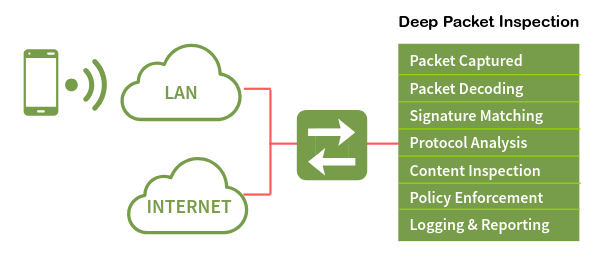
Think of it this way. WireGuard is like a courier who always wears the same uniform — fast, reliable, and efficient. But anyone watching the road learns to recognize that uniform and can stop the courier at any checkpoint. AmneziaWG is the same courier carrying the same packages, but they change uniforms at every checkpoint. Same person, same cargo, completely different appearance.
The version history matters here. AmneziaWG 1.x introduced custom headers that differed from WireGuard’s fixed values — it helped for a while, but DPI systems adapted. AmneziaWG 2.0, released in late 2025, randomizes everything: headers change per packet, padding varies per message, and decoy packets mimic other protocols before the real handshake begins. There is no universal signature to detect because every AmneziaWG 2.0 server generates its own unique parameter set. Each server speaks its own dialect.
When all obfuscation parameters are set to zero, AmneziaWG behaves identically to WireGuard — it’s fully backward compatible at the protocol level. But with parameters active (which is the default), it becomes something WireGuard cannot be: a fast VPN tunnel that DPI systems struggle to identify.
So how exactly does AmneziaWG scramble its traffic? Let’s look at the four obfuscation layers that make DPI blind — and why they add almost no speed cost.
How AmneziaWG Hides From DPI (Without Losing Speed)
AmneziaWG 2.0 uses four layered obfuscation techniques that work together. Each one targets a different way DPI systems identify VPN traffic. Together, they make every server’s traffic look unique.
Dynamic Headers (H1–H4)
WireGuard uses fixed 32-bit message type identifiers:
- 1 — for initiation
- 2 — for response
- 3 — for cookie reply
- 4 — for data
A DPI box scanning traffic just looks for these values. AmneziaWG 2.0 replaces each fixed value with a random number drawn from a configured range. The initiation header (H1) might be any value between 234567 and 345678. The response header (H2) might be between 3456789 and 4567890. These ranges never overlap — the protocol still needs to distinguish packet types internally — but to an outside observer, there’s no single header value to latch onto. Every packet looks different from the last.
Random Padding (S1–S4)
WireGuard’s initiation packet is always exactly 148 bytes. Its response is always exactly 92 bytes. These fixed sizes are another fingerprint. AmneziaWG adds random padding to each packet type: the initiation becomes 148+S1 bytes, the response becomes 92+S2 bytes, the cookie reply becomes 64+S3 bytes, and every data packet gets S4 bytes of padding. S3 and S4 are new in version 2.0 — and S4 is the most significant addition because it touches every single data packet, making session-wide traffic analysis much harder.
There’s one critical constraint: S1+56 must not equal S2. Since the original size difference between initiation and response is 56 bytes (148−92), if the padding values happened to compensate for exactly that difference, the two padded packets would end up the same size — recreating the fingerprint AmneziaWG is trying to eliminate. The installer’s parameter generator enforces this constraint automatically.
Custom Protocol Signature (I1–I5)
Before the real WireGuard handshake begins, the AmneziaWG client sends up to five decoy packets that mimic other protocols — QUIC, DNS, SIP, or custom byte patterns. The server ignores these packets entirely. It just waits for the real handshake.
- A simple configuration: Sends 128 random bytes <r 128>.
- A sophisticated configuration: Sends bytes that look like a QUIC connection initiation (<b 0xc000000001><r 64><t>), complete with a Unix timestamp.
To a DPI system watching the session start, the first packets look like normal web traffic.
Junk Packets (Jc, Jmin, Jmax)
After the decoy packets, the client fires a configurable number of junk packets — pure noise with random sizes between Jmin and Jmax. These blur the timing and size profile of the session start, making it harder for DPI systems to identify where the real handshake begins.
The Speed Question
There’s a number that’s been circulating online: AmneziaWG has 65% overhead. That figure is real, but it refers to the userspace Go implementation — not the kernel module. The community installer used in this guide builds a DKMS kernel module, and the kernel module adds less than 12% overhead total — closer to 3% in real-world benchmarks. On an uncensored network, you’d see roughly 95 Mbps through WireGuard and 92 Mbps through AmneziaWG 2.0. In a censored network, the comparison is 92 Mbps versus zero.
The following table summarizes the parameters the installer generates automatically:
| Parameter | Generated Range | Example Value |
|---|---|---|
Jc (junk packet count) | 4–8 | 6 |
Jmin (min junk size) | 40–89 | 55 |
Jmax (max junk size) | Jmin+100 to Jmin+500 | 380 |
S1 (init padding) | 15–150 | 72 |
S2 (response padding) | 15–150, S1+56≠S2 | 56 |
S3 (cookie padding) | 8–55 | 32 |
S4 (data padding) | 4–27 | 16 |
H1 (init header range) | uint32 non-overlapping | 234567-345678 |
H2 (response header range) | uint32 non-overlapping | 3456789-4567890 |
H3 (cookie header range) | uint32 non-overlapping | 56789012-67890123 |
H4 (data header range) | uint32 non-overlapping | 456789012-567890123 |
I1 (CPS packet) | <r N> format | <r 128> |
You don’t need to set any of these manually. The installer generates cryptographically random, constraint-valid values every time.
Now that you know how the obfuscation works, let’s see how AmneziaWG stacks up against the alternatives you might be considering.
AmneziaWG vs Alternatives — Quick Decision Guide
| WireGuard | AmneziaWG 2.0 | OpenVPN+obfs4 | Shadowsocks | VLESS+Reality | |
|---|---|---|---|---|---|
| DPI resistance | Low | High | Medium | Medium | Very High |
| Speed overhead | ~4% | <12% (~3% real-world) | ~25% | ~8% | ~10% |
| Full VPN tunnel | Yes | Yes | Yes | No (proxy) | No (proxy) |
| Runs in kernel | Yes | Yes (DKMS) | No | No | No |
| Setup complexity | Low | Low (with installer) | High | Medium | High |
| Transport | UDP | UDP | TCP/UDP | TCP | TCP |
The decision rules are straightforward:
- No DPI in your country? Use plain WireGuard. It’s simpler and has a larger ecosystem.
- Need maximum DPI resistance and OK with a proxy? VLESS+Reality is the strongest option for obfuscation, but it’s not a full tunnel.
- Want both speed and a full tunnel with obfuscation? AmneziaWG 2.0 is the only option that delivers WireGuard-grade performance with real DPI resistance in a complete VPN tunnel.
- Already using OpenVPN+obfs4 and it still works? No urgent need to switch, but AmneziaWG will be noticeably faster.
This article focuses on AmneziaWG because it’s the only protocol that gives you a full tunnel, kernel-level performance, and built-in obfuscation — all configured by a single script.
If AmneziaWG is the right choice for your situation, here’s exactly what you need before we start deploying.
What You’ll Need Before Starting
Before running the installer, make sure your environment meets these requirements:
| Requirement | Detail | Why |
|---|---|---|
| OS | Ubuntu 24.04 LTS (clean install). Ubuntu 25.10 is experimental. Debian 12/13 work but may needcurl pre-installed. | The installer is tested and fully supported on Ubuntu 24.04. |
| VPS specs | 1 vCore, 1 GB RAM, 25 GB storage. Any $3–5/month plan works. | The installer needs ~2 GB disk and ~1 GB RAM during the DKMS build. The running VPN uses negligible resources. |
| Virtualization | KVM (not OpenVZ, not LXC). | AmneziaWG loads a kernel module via DKMS. LXC shares the host kernel and cannot load custom modules. |
| SSH access | Root or sudo user with password/key authentication. | The installer must run as root. |
| SSH port | Default 22, or pre-opened in UFW if using a non-standard port. | If SSH isn’t on port 22 and you don’t pre-open it, the installer’s firewall setup will lock you out. |
| Client app | Amnezia VPN >= 4.8.12.7 (all platforms). | AWG 2.0 parameters are not understood by older clients. The standard WireGuard client does not support AWG at all. |
⚠️ Warning: LXC containers are not supported. If your VPS uses LXC virtualization, the DKMS kernel module build will fail. You must use KVM or bare-metal. Check with your provider if you’re unsure.
⚠️ Warning: If your SSH runs on a non-standard port (anything other than 22), you must open it in UFW before running the installer:
sudo ufw allow YOUR_PORT/tcpReplace
YOUR_PORTwith your actual SSH port. The installer enables UFW with a default-deny policy — if your SSH port isn’t allowed, you’ll be locked out immediately.
💡 Tip: Wait 5–10 minutes after creating your VPS before running the installer. Cloud-init and background initialization processes can conflict with the
apt-getcalls the installer makes.
With your VPS ready and prerequisites confirmed, let’s deploy AmneziaWG 2.0 using the community installer script — the fastest and most transparent method.
Cuvinte cheie
| Cuvânt cheie | Definiție |
|---|---|
| 🛡️ AmneziaWG | Un fork al WireGuard care randomizează antetele pachetelor, dimensiunile și timpii pentru a rezista la Inspecția Profundă a Pachetelor, menținând în același timp aceeași criptografie auditată. Este protocolul care rulează pe serverul tău. |
| 🚀 AmneziaWG 2.0 | Versiunea majoră actuală care folosește intervale dinamice de antete (în loc de valori fixe), adaugă umplutură la nivel de date (S4) și suportă pachete decoy cu semnătură de protocol personalizată pentru o evaziune mai puternică a DPI. |
| 🔍 Inspecția Profundă a Pachetelor (DPI) | O tehnică de filtrare a rețelei utilizată de ISP-uri și guverne pentru a identifica și bloca traficul VPN prin analizarea antetelor pachetelor, dimensiunilor și modelelor de handshake. AmneziaWG este proiectat special pentru a o înfrunta. |
| ⚡ WireGuard | Un protocol VPN rapid și modern cu un cod sursă mic și performanță la nivel de kernel. Este ușor de identificat de sistemele DPI datorită structurii fixe a pachetelor, ceea ce este ceea ce AmneziaWG a fost construit să remedieze. |
| 🏠 VPN auto-găzduit | Un VPN pe care îl desfășori și gestionezi pe propriul server (de obicei un VPS) în loc să te abonezi la un furnizor comercial. Tu controlezi cheile, configurația și infrastructura. |
| 🐧 DKMS (Suport pentru Module de Kernel Dinamic) | Un cadru Linux care recompilă automat modulele de kernel atunci când kernelul sistemului este actualizat. Instalatorul AmneziaWG folosește DKMS pentru a construi modulul de kernel de înaltă performanță. |
| 🎭 Obfuscarea | Practică de a deghiza traficul VPN pentru a arăta ca traficul obișnuit de internet. AmneziaWG obfuscă la nivel de transport prin randomizarea antetelor, adăugarea de umplutură, trimiterea de pachete decoy și generarea de pachete de gunoi. |
| 🔀 Tunneling divizat | O configurație de rutare în care doar un trafic specific (de exemplu, site-uri blocate) trece prin VPN, în timp ce restul folosește conexiunea ta directă. Utilă în țările cu cenzură parțială. |
| 🖥️ KVM vs LXC | KVM este virtualizare completă cu un kernel dedicat, necesar pentru încărcarea modulelor de kernel personalizate precum AmneziaWG. LXC este o virtualizare bazată pe containere care împarte kernelul gazdei și nu poate încărca module personalizate. |
| 🎪 CPS (Semnătură de Protocol Personalizată) | O caracteristică AmneziaWG 2.0 care trimite pachete decoy care imită alte protocoale (QUIC, DNS, SIP) înainte de handshake-ul real, păcălind sistemele DPI să clasifice traficul ca fiind normal. |
Auto-găzduiește un server VPN AmneziaWG — Ghid complet
AmneziaWG este un protocol conceput pentru a rezolva o problemă specifică: cum obții viteza WireGuard atunci când rețelele prin care te conectezi încearcă activ să o blocheze? Este un fork al WireGuard construit de echipa Amnezia VPN și face un lucru pe care originalul nu-l face — randomizează stratul de transport astfel încât sistemele de Inspecție Profundă a Pachetelor să nu-l poată identifica. Criptarea de bază rămâne exact aceeași. Ceea ce se schimbă este modul în care arată pachetele pe fir.
Peisajul mai larg al obfuscării VPN-urilor a fost o cursă înarmată de ani de zile. Instrumente precum Shadowsocks, VLESS+Reality și OpenVPN cu obfs4 încearcă toate să deghizeze traficul în moduri diferite — unele ca proxy-uri, altele ca tuneluri complete, unele cu costuri mari de performanță. AmneziaWG se află într-un nișă specifică: este un tunel VPN complet cu performanță la nivel de WireGuard și rezistență încorporată la DPI, toate într-un singur pachet. Și deoarece este open-source, poți să-l auto-găzduiești pe propriul server.
Dar iată problema care face acest lucru necesar. Ai configurat WireGuard. Funcționează perfect — rapid, curat, fiabil. Apoi, într-o zi, se oprește. Fără mesaj de eroare, fără timeout, fără conexiune refuzată. Pachetele pur și simplu dispar. Așa arată blocarea DPI în practică: tunelul tău încă funcționează, configurația ta este încă corectă și nimic nu trece. Aceasta este realitatea în Rusia (unde WireGuard are aproximativ 12% rată de succes), Iran (98% pierdere de pachete) și o listă tot mai mare de țări, inclusiv China, Egipt, EAU, Turcia, Belarus, Uzbekistan, Kazahstan, Myanmar și Pakistan.
Alternativele tradiționale nu rezolvă complet acest lucru. Shadowsocks este un proxy, nu un tunel VPN complet — DNS-ul tău și traficul non-TCP încă se scurg. OpenVPN cu obfs4 funcționează, dar are un overhead de aproximativ 25% din performanță. VLESS+Reality oferă o obfuscare puternică, dar este bazat pe proxy și complex de configurat. AmneziaWG umple golul: un tunel VPN complet cu viteza WireGuard și rezistența la DPI integrate.
Acest ghid te va ghida prin desfășurarea unui server AmneziaWG 2.0 complet funcțional pe orice VPS KVM în mai puțin de 15 minute folosind un singur script de instalare comunitar. La final, vei avea un tunel VPN funcțional la care te poți conecta de pe orice dispozitiv. Pașii sunt independenți de furnizor — funcționează pe orice VPS cu acces root SSH, fie că este de la AlexHost, AvaHost sau altundeva. Acest text este scris pentru utilizatori tehnici intermediari care sunt confortabili cu SSH și comenzi Linux de bază.
O clarificare înainte de a începe: AmneziaWG este protocolul. AmneziaVPN este aplicația client care se conectează la acesta. Ele sunt legate, dar distincte — la fel cum TLS este pentru browserul tău. Vei avea nevoie de aplicație pentru a te conecta, dar protocolul este ceea ce rulează pe serverul tău.
Dar înainte de a desfășura orice, trebuie să înțelegi ce face AmneziaWG diferit de WireGuard — și de ce această diferență contează atunci când DPI este atent.
Ce este AmneziaWG? (Modelul mental)
WireGuard este elegant prin design. Are un cod sursă mic, folosește criptografie modernă și rulează în kernelul Linux pentru performanță aproape nativă. Dar acea eleganță vine cu o problemă de vizibilitate: fiecare pachet WireGuard poartă aceeași structură fixă de antet, aceleași dimensiuni fixe ale pachetelor și același model de handshake. Pentru un sistem de Inspecție Profundă a Pachetelor, un tunel WireGuard are o semnătură la fel de clară ca un cod de bare. Odată ce o cutie DPI învață acea semnătură, poate elimina fiecare pachet fără a bloca portul sau a închide conexiunea.
Gândește-te la asta în felul următor. WireGuard este ca un curier care poartă întotdeauna aceeași uniformă — rapid, fiabil și eficient. Dar oricine observă drumul învață să recunoască acea uniformă și poate opri curierul la orice punct de control. AmneziaWG este același curier care transportă aceleași pachete, dar își schimbă uniforma la fiecare punct de control. Aceeași persoană, aceeași marfă, apariție complet diferită.
Istoricul versiunilor contează aici. AmneziaWG 1.x a introdus antete personalizate care diferă de valorile fixe ale WireGuard — a ajutat pentru o vreme, dar sistemele DPI s-au adaptat. AmneziaWG 2.0, lansat la sfârșitul anului 2025, randomizează totul: antetele se schimbă pe pachet, umplutura variază pe mesaj, iar pachetele decoy imită alte protocoale înainte de a începe handshake-ul real. Nu există o semnătură universală de detectat pentru că fiecare server AmneziaWG 2.0 generează propriul set de parametri unic. Fiecare server vorbește propriul său dialect.
Când toate parametrii de obfuscare sunt setați la zero, AmneziaWG se comportă identic cu WireGuard — este complet compatibil la nivel de protocol. Dar cu parametrii activi (ceea ce este implicit), devine ceva ce WireGuard nu poate fi: un tunel VPN rapid pe care sistemele DPI se luptă să-l identifice.
Deci, cum exact își scramblează AmneziaWG traficul? Să ne uităm la cele patru straturi de obfuscare care fac DPI orb — și de ce adaugă aproape niciun cost de viteză.
Cum se ascunde AmneziaWG de DPI (fără a pierde viteză)
AmneziaWG 2.0 folosește patru tehnici de obfuscare stratificate care lucrează împreună. Fiecare vizează o modalitate diferită prin care sistemele DPI identifică traficul VPN. Împreună, ele fac ca traficul fiecărui server să arate unic.
Antete dinamice (H1–H4)
WireGuard folosește identificatori de tip de mesaj fixați de 32 de biți:
- 1 — pentru inițiere
- 2 — pentru răspuns
- 3 — pentru răspuns cookie
- 4 — pentru date
O cutie DPI care scanează traficul caută doar aceste valori. AmneziaWG 2.0 înlocuiește fiecare valoare fixă cu un număr aleatoriu extras dintr-un interval configurat. Antetul de inițiere (H1) ar putea fi orice valoare între 234567 și 345678. Antetul de răspuns (H2) ar putea fi între 3456789 și 4567890. Aceste intervale nu se suprapun niciodată — protocolul trebuie să distingă în continuare tipurile de pachete intern — dar pentru un observator extern, nu există o singură valoare de antet la care să se agățe. Fiecare pachet arată diferit de ultimul.
Umplutură aleatoare (S1–S4)
Pachetul de inițiere al WireGuard este întotdeauna exact 148 de biți. Răspunsul său este întotdeauna exact 92 de biți. Aceste dimensiuni fixe sunt o altă amprentă. AmneziaWG adaugă umplutură aleatoare fiecărui tip de pachet: inițierea devine 148+S1 biți, răspunsul devine 92+S2 biți, răspunsul cookie devine 64+S3 biți, iar fiecare pachet de date primește S4 biți de umplutură. S3 și S4 sunt noi în versiunea 2.0 — iar S4 este cea mai semnificativă adăugare deoarece atinge fiecare pachet de date, făcând analiza traficului pe sesiune mult mai dificilă.
Există o constrângere critică: S1+56 nu trebuie să fie egal cu S2. Deoarece diferența de dimensiune originală între inițiere și răspuns este de 56 de biți (148−92), dacă valorile de umplutură se întâmplă să compenseze exact acea diferență, cele două pachete umplute ar ajunge la aceeași dimensiune — recreând amprenta pe care AmneziaWG încearcă să o elimine. Generatorul de parametrii al instalatorului impune automat această constrângere.
Semnătură de Protocol Personalizată (I1–I5)
Înainte de a începe adevăratul handshake WireGuard, clientul AmneziaWG trimite până la cinci pachete decoy care imită alte protocoale — QUIC, DNS, SIP sau modele de biți personalizate. Serverul ignoră complet aceste pachete. Așteaptă doar handshake-ul real.
- O configurare simplă: Trimite 128 de biți aleatori <r 128>.
- O configurare sofisticată: Trimite biți care arată ca o inițiere a conexiunii QUIC (<b 0xc000000001><r 64><t>), complet cu un timestamp Unix.
Pentru un sistem DPI care observă începutul sesiunii, primele pachete arată ca trafic web normal.
Pachete de gunoi (Jc, Jmin, Jmax)
După pachetele decoy, clientul trimite un număr configurabil de pachete de gunoi — zgomot pur cu dimensiuni aleatoare între Jmin și Jmax. Acestea estompează profilul de timp și dimensiune al începutului sesiunii, făcând mai greu pentru sistemele DPI să identifice unde începe adevăratul handshake.
Întrebarea vitezei
Există un număr care circulă online: AmneziaWG are un overhead de 65%. Acea cifră este reală, dar se referă la implementarea utilizatorului Go — nu la modulul de kernel. Instalatorul comunității utilizat în acest ghid construiește un modul de kernel DKMS, iar modulul de kernel adaugă mai puțin de 12% overhead total — mai aproape de 3% în benchmark-uri din lumea reală. Pe o rețea ne-cenzurată, ai vedea aproximativ 95 Mbps prin WireGuard și 92 Mbps prin AmneziaWG 2.0. Pe o rețea cenzurată, comparația este 92 Mbps versus zero.
Tabelul următor rezumă parametrii pe care instalatorul îi generează automat:
| Parametru | Interval generat | Valoare exemplu |
|---|---|---|
Jc (numărul de pachete de gunoi) | 4–8 | 6 |
Jmin (dimensiunea minimă a gunoiului) | 40–89 | 55 |
Jmax (dimensiunea maximă a gunoiului) | Jmin+100 la Jmin+500 | 380 |
S1 (umplutura inițială) | 15–150 | 72 |
S2 (umplutura răspunsului) | 15–150, S1+56≠S2 | 56 |
S3 (umplutura cookie) | 8–55 | 32 |
S4 (umplutura datelor) | 4–27 | 16 |
H1 (intervalul antetului inițial) | uint32 fără suprapunere | 234567-345678 |
H2 (intervalul antetului răspunsului) | uint32 fără suprapunere | 3456789-4567890 |
H3 (intervalul antetului cookie) | uint32 fără suprapunere | 56789012-67890123 |
H4 (intervalul antetului datelor) | uint32 fără suprapunere | 456789012-567890123 |
I1 (pachet CPS) | <r N> format | <r 128> |
Nu trebuie să setezi manual niciunul dintre aceștia. Instalatorul generează valori valide din punct de vedere criptografic, conforme cu constrângerile de fiecare dată.
Acum că știi cum funcționează obfuscarea, să vedem cum se compară AmneziaWG cu alternativele pe care le-ai putea lua în considerare.
AmneziaWG vs Alternative — Ghid rapid de decizie
| WireGuard | AmneziaWG 2.0 | OpenVPN+obfs4 | Shadowsocks | VLESS+Reality | |
|---|---|---|---|---|---|
| Rezistența la DPI | Scăzută | Ridicată | Medie | Medie | Foarte ridicată |
| Overhead de viteză | ~4% | <12% (~3% în lumea reală) | ~25% | ~8% | ~10% |
| Tunel VPN complet | Da | Da | Da | Nu (proxy) | Nu (proxy) |
| Rulează în kernel | Da | Da (DKMS) | Nu | Nu | Nu |
| Complexitatea configurării | Scăzută | Scăzută (cu instalator) | Ridicată | Medie | Ridicată |
| Transport | UDP | UDP | TCP/UDP | TCP | TCP |
Regulile de decizie sunt simple:
- Fără DPI în țara ta? Folosește WireGuard simplu. Este mai simplu și are un ecosistem mai mare.
- Ai nevoie de rezistență maximă la DPI și ești de acord cu un proxy? VLESS+Reality este cea mai puternică opțiune pentru obfuscare, dar nu este un tunel complet.
- Vrei atât viteză, cât și un tunel complet cu obfuscare? AmneziaWG 2.0 este singura opțiune care oferă performanță de nivel WireGuard cu adevărat rezistentă la DPI într-un tunel VPN complet.
- Folosești deja OpenVPN+obfs4 și încă funcționează? Nu este o nevoie urgentă de a schimba, dar AmneziaWG va fi vizibil mai rapid.
Acest articol se concentrează pe AmneziaWG deoarece este singurul protocol care îți oferă un tunel complet, performanță la nivel de kernel și obfuscare încorporată — toate configurate printr-un singur script.
Dacă AmneziaWG este alegerea potrivită pentru situația ta, iată exact ce ai nevoie înainte de a începe desfășurarea.
Ce vei avea nevoie înainte de a începe
Înainte de a rula instalatorul, asigură-te că mediul tău îndeplinește aceste cerințe:
| Cerință | Detaliu | De ce |
|---|---|---|
| OS | Ubuntu 24.04 LTS (instalare curată). Ubuntu 25.10 este experimental. Debian 12/13 funcționează, dar poate necesitacurl pre-installed. | Instalatorul este testat și complet suportat pe Ubuntu 24.04. |
| Specificații VPS | 1 vCore, 1 GB RAM, 25 GB stocare. Orice plan de 3–5 $/lună funcționează. | Instalatorul are nevoie de ~2 GB disk și ~1 GB RAM în timpul construcției DKMS. VPN-ul în execuție folosește resurse neglijabile. |
| Virtualizare | KVM (nu OpenVZ, nu LXC). | AmneziaWG încarcă un modul de kernel prin DKMS. LXC împarte kernelul gazdei și nu poate încărca module personalizate. |
| Acces SSH | Utilizator root sau sudo cu autentificare prin parolă/cheie. | Instalatorul trebuie să ruleze ca root. |
| Port SSH | Implicit 22, sau pre-deschis în UFW dacă folosești un port non-standard. | Dacă SSH nu este pe portul 22 și nu îl deschizi dinainte, configurarea firewall-ului instalatorului te va bloca. |
| Aplicația client | Amnezia VPN >= 4.8.12.7 (toate platformele). | Parametrii AWG 2.0 nu sunt înțeleși de clienții mai vechi. Clientul standard WireGuard nu suportă AWG deloc. |
⚠️ Atenție: Containerele LXC nu sunt suportate. Dacă VPS-ul tău folosește virtualizare LXC, construcția modulului de kernel DKMS va eșua. Trebuie să folosești KVM sau bare-metal. Verifică cu furnizorul tău dacă nu ești sigur.
⚠️ Atenție: Dacă SSH-ul tău rulează pe un port non-standard (orice altceva decât 22), trebuie să-l deschizi în UFW înainte de a rula instalatorul:
sudo ufw allow YOUR_PORT/tcpÎnlocuiește
YOUR_PORTcu portul tău SSH real. Instalatorul activează UFW cu o politică de refuz implicit — dacă portul tău SSH nu este permis, vei fi blocat imediat.
💡 Sfaturi: Așteaptă 5–10 minute după crearea VPS-ului tău înainte de a rula instalatorul. Cloud-init și procesele de inițializare în fundal pot intra în conflict cu apelurile
apt-getpe care le face instalatorul.
Cu VPS-ul tău pregătit și cerințele confirmate, să desfășurăm AmneziaWG 2.0 folosind scriptul de instalare comunitar — cea mai rapidă și transparentă metodă.
Cuvinte cheie
| Cuvânt cheie | Definiție |
|---|---|
| 🛡️ AmneziaWG | O ramură a WireGuard care randomizează anteturile pachetelor, dimensiunile și timpii de transmisie pentru a contracara inspectarea profundă a pachetelor, menținând în același timp aceeași criptografie dovedită. Acesta este un protocol care rulează pe serverul dvs. |
| 🚀 AmneziaWG 2.0 | Versiunea principală actuală care utilizează intervale de antet dinamice (în loc de valori fixe), adaugă padding la nivel de date (S4) și suportă pachete de substituție cu o semnătură de protocol personalizată pentru o eludare DPI mai puternică. |
| 🔍 Deep Packet Inspection (DPI) | O tehnică de filtrare a rețelei utilizată de furnizorii de internet și entitățile guvernamentale pentru a identifica și bloca traficul VPN prin analiza anteturilor pachetelor, dimensiunilor și modelelor de apăsare. AmneziaWG este conceput în mod specific pentru a contracara acest lucru. |
| ⚡ WireGuard | Un protocol VPN rapid și modern cu o bază de cod mică și performanță la nivel de kernel. Este ușor de identificat de sistemele DPI datorită structurii sale fixe a pachetelor, care a fost abordată în AmneziaWG. |
| 🏠 VPN auto-găzduit | Un VPN pe care îl implementați și gestionați pe propriul dvs. server (de obicei un VPS) în loc să vă abonați la un furnizor comercial. Controlați cheile, configurația și infrastructura. |
| 🐧 DKMS (Dynamic Kernel Module Support) | Un cadru Linux care recompilează automat modulele kernel atunci când kernelul sistemului este actualizat. Instalatorul AmneziaWG utilizează DKMS pentru a construi un modul kernel de înaltă performanță. |
| 🎭 Obfuscație | Practica de a masca traficul VPN pentru a-l face să pară trafic internet obișnuit. AmneziaWG obfuscă la nivelul transportului prin randomizarea anteturilor, adăugarea de padding, trimiterea de pachete de substituție și generarea de pachete de gunoi. |
| 🔀 Split tunneling | O configurație de rutare în care doar traficul specific (de exemplu, site-uri blocate) trece prin VPN, în timp ce alt trafic utilizează conexiunea dvs. directă. Util în țările cu cenzură parțială. |
| 🖥️ KVM vs LXC | KVM este virtualizare completă cu un kernel dedicat necesar pentru încărcarea modulelor kernel personalizate, cum ar fi AmneziaWG. LXC este virtualizare pe containere care utilizează kernelul partajat al gazdei și nu poate încărca module personalizate. |
| 🎪 CPS (Custom Protocol Signature) | O caracteristică a AmneziaWG 2.0 care trimite pachete de substituție care imită alte protocoale (QUIC, DNS, SIP) înainte de apăsarea reală, înșelând sistemele DPI prin clasificarea traficului ca normal. |
🔄 Actualizare (iulie 2026): Acest ghid păstrează procedura sa originală intactă, dar eticheta instalatorului fixată prezentată mai jos, v5.8.1, nu mai este actuală. Cea mai recentă versiune a amneziawg-installer este v5.18.4, care adaugă suport pentru Debian 12 și 13, module kernel gata făcute pentru ARM64 și Raspberry Pi, Ubuntu 25.10 și 26.04, modul cascadă și îmbunătățiri suplimentare de securitate.
Dacă urmați acest ghid astazi, înlocuiți comanda mai veche fixată cu
wget https://raw.githubusercontent.com/bivlked/amneziawg-installer/v5.18.4/install_amneziawg_en.shsau verificați eticheta curentă pe pagina celei mai recente versiuni înainte de implementare.
Server VPN AmneziaWG cu Implementare Autonomă — Ghid Complet

AmneziaWG este un protocol conceput pentru a rezolva o problemă specifică: cum să obții vitezele WireGuard atunci când rețelele la care te conectezi încearcă activ să-l blocheze? Este un fork al WireGuard creat de echipa Amnezia VPN, și face ceea ce originalul nu face — randomizează stratul de transport, astfel încât sistemele de inspecție profundă a pachetelor nu pot să-l identifice. Criptarea rămâne exact aceeași. Se schimbă doar aspectul pachetelor în rețea.
Peisajul larg al ofuscării VPN a fost o cursă a înarmării de-a lungul anilor. Instrumente precum Shadowsocks, VLESS+Reality și OpenVPN cu obfs4 încearcă să deghizeze traficul în diverse moduri — unele ca proxy-uri, altele ca tuneluri complete, unele cu costuri mari de performanță. AmneziaWG ocupă o nișă specifică: este un tunel VPN complet cu performanța la nivel WireGuard și protecție DPI încorporată, totul într-un singur pachet. Și deoarece este open-source, îl poți implementa pe propriul tău server.
Dar iată problema care face aceasta necesară. Configurezi WireGuard. Funcționează perfect — rapid, curat, fiabil. Apoi într-o zi frumoasă, se oprește. Niciun mesaj de eroare, niciun timeout, niciun refuz de conexiune. Pachetele pur și simplu dispar. Aceasta este cum arată blocarea DPI în practică: tunelul tău este încă operațional, configurația ta este încă corectă, și nimic nu trece prin. Aceasta este deja realitatea în unele țări.

Alternativele tradiționale nu rezolvă complet această problemă. Shadowsocks este un proxy, nu un tunel VPN complet — DNS-ul și traficul non-TCP vor fi în continuare expuse. OpenVPN cu obfs4 funcționează, dar are aproximativ 25% overhead de performanță. VLESS+Reality oferă ofuscare puternică, dar este bazat pe proxy și complex de configurat. AmneziaWG umple golul: este un tunel VPN complet cu performanța la nivel WireGuard și protecție DPI încorporată.
Acest ghid te va ghida prin implementarea unui server AmneziaWG 2.0 complet funcțional pe orice VPS KVM în mai puțin de 15 minute folosind un singur script de instalare din comunitate. La final, vei avea un tunel VPN funcțional la care te poți conecta de pe orice dispozitiv. Pașii sunt independenți de furnizor — funcționează pe orice VPS cu acces SSH și privilegii root, indiferent dacă este de la AvaHost sau altul. Aceasta este scrisă pentru utilizatori cu un nivel intermediar de abilități tehnice care sunt confortabili cu SSH și comenzile Linux de bază.
O clarificare înainte de a începe: AmneziaWG este un protocol. AmneziaVPN este o aplicație client care se conectează la el. Sunt legate, dar distincte — ca TLS pentru browserul tău. Vei avea nevoie de o aplicație pentru a te conecta, dar protocolul este ceea ce rulează pe serverul tău.
Dar înainte de a implementa orice, trebuie să înțelegi ce face AmneziaWG diferit de WireGuard — și de ce această diferență contează atunci când DPI te urmărește.
Ce este AmneziaWG? (Model Mental)
WireGuard este elegant în design. Are o bază de cod mică, folosește criptografie modernă și rulează în kernelul Linux pentru performanță aproape nativă. Dar această eleganță are o problemă de vizibilitate: fiecare pachet WireGuard poartă aceeași structură de antet fixă, aceleași dimensiuni fixe de pachete și același model de handshake. Pentru un sistem de inspecție profundă a pachetelor, tunelul WireGuard are o semnătură la fel de clară ca un cod de bare. Odată ce un dispozitiv DPI învață această semnătură, poate renunța la fiecare pachet fără a bloca portul sau a închide conexiunea.

AmneziaWG este o ramură a WireGuard-Go creată de echipa Amnezia VPN. A moștenit simplitatea arhitecturală a WireGuard — același schimb de chei Curve25519, aceeași criptare ChaCha20-Poly1305, același handshake Noise IK. Toată criptografia rămâne neschimbată și este, de asemenea, verificată. Ceea ce AmneziaWG schimbă este stratul de transport: antetele pachetelor, dimensiunile pachetelor și modelele de sincronizare.
Gândește-te la asta în felul următor. WireGuard este ca un curier care poartă întotdeauna aceeași uniformă — rapid, fiabil și eficient. Dar oricine privește pe drum învață să recunoască acea uniformă și poate opri curierul la orice punct de control. AmneziaWG este același curier care transportă aceleași pachete, dar și schimbă uniforma la fiecare punct de control. Aceeași persoană, aceeași marfă, o apariție complet diferită.
Istoricul versiunilor contează. AmneziaWG 1.x a introdus anteturi personalizate care difereau de valorile fixe ale WireGuard — aceasta a ajutat pentru o vreme, dar sistemele DPI s-au adaptat. AmneziaWG 2.0, lansat în finele anului 2025, randomizează totul: antetele se schimbă de la pachet la pachet, umplerea variază de la mesaj la mesaj, iar pachetele substitut imită alte protocoale înainte de handshake-ul efectiv. Nu există o semnătură universală pentru detectare, deoarece fiecare server AmneziaWG 2.0 generează propriul set unic de parametri. Fiecare server vorbește propriul dialect.
Când toți parametrii de ofuscare sunt setați la zero, AmneziaWG se comportă identic cu WireGuard — este pe deplin compatibil la nivel de protocol. Dar cu parametri activi (care este setarea implicită), devine ceea ce WireGuard nu poate fi: un tunel VPN rapid pe care sistemele DPI au dificultăți să-l identifice.
Deci, cum exact criptează AmneziaWG traficul său? Să ne uităm la cele patru niveluri de ofuscare care fac DPI-ul orb — și de ce adaugă aproape niciun cost de viteză.
Cum AmneziaWG se ascunde de DPI (Fără pierdere de viteză)
AmneziaWG 2.0 utilizează patru niveluri de ofuscare care funcționează împreună. Fiecare vizează o modalitate diferită prin care sistemele DPI identifică traficul VPN. Împreună, ele fac traficul fiecărui server unic.
Anteturi dinamice (H1–H4)
WireGuard utilizează identificatori de tip mesaj fixi de 32 de biți:
- 1 — pentru inițiere
- 2 — pentru răspuns
- 3 — pentru răspuns cu cookie
- 4 — pentru date
Un dispozitiv DPI care scanează traficul caută pur și simplu aceste valori. AmneziaWG 2.0 înlocuiește fiecare valoare fixă cu un număr aleator ales dintr-un interval specificat. Antetul de inițiere (H1) poate fi orice valoare între 234567 și 345678. Antetul de răspuns (H2) poate fi între 3456789 și 4567890. Aceste intervale nu se suprapun niciodată — protocolul trebuie să distingă în continuare tipurile de pachete la nivel intern — dar pentru un observator extern, nu există o singură valoare de antet pe care să se agățe. Fiecare pachet arată diferit de cel anterior.
Umplutură aleatorie (S1–S4)
Pachetul de inițiere al WireGuard are întotdeauna exact 148 de octeți. Răspunsul acestuia are întotdeauna exact 92 de octeți. Aceste dimensiuni fixe sunt o altă amprentă. AmneziaWG adaugă umplutură aleatorie fiecărui tip de pachet: inițierea devine 148+S1 octeți, răspunsul devine 92+S2 octeți, răspunsul cu cookie devine 64+S3 octeți, iar fiecare pachet de date primește S4 octeți de umplutură. S3 și S4 sunt noi în versiunea 2.0 — și S4 este cea mai semnificativă adăugire, deoarece afectează fiecare pachet de date, făcând analiza traficului la nivel de sesiune mult mai dificilă.
Există o constrângere critică: S1+56 nu trebuie să fie egal cu S2. Deoarece diferența de dimensiune originală între inițiere și răspuns este de 56 de octeți (148−92), dacă valorile de umplutură compensează aleator exact acea diferență, două pachete umplute vor ajunge la aceeași dimensiune — recreând amprenta pe care AmneziaWG încearcă să o elimine. Generatorul de parametri al instalatorului asigură automat această constrângere.
Semnătură de protocol personalizată (I1–I5)
Înainte ca apelul de mână real să înceapă, clientul AmneziaWG trimite până la cinci pachete substitute care imită alte protocoale — QUIC, DNS, SIP sau modele de octeți personalizate. Serverul ignoră complet aceste pachete. Pur și simplu așteaptă apelul de mână real.
- Configurație simplă: Trimite 128 de octeți aleatori <r 128>.
- Configurație complexă: Trimite octeți care arată ca inițierea unei conexiuni QUIC (<b 0xc000000001><r 64><t>), cu o marcă de timp Unix.
Pentru un sistem DPI care observă începutul sesiunii, primele pachete arată ca trafic web obișnuit.
Pachete de gunoi (Jc, Jmin, Jmax)
După pachetele substitute, clientul trimite un număr personalizabil de pachete de gunoi — zgomot pur cu dimensiuni aleatorii între Jmin și Jmax. Aceste pachete estompează profilul de sincronizare și dimensiune al începutului sesiunii, făcând mai dificil pentru sistemele DPI să identifice unde începe apelul de mână real.
Întrebarea despre viteză
Există un număr care circulă pe internet: AmneziaWG are 65% overhead. Această cifră este reală, dar se referă la implementarea Go în spațiul utilizatorului — nu la modulul kernel. Instalatorul comunității utilizat în acest ghid construiește un modul kernel DKMS, iar modulul kernel adaugă mai puțin de 12% overhead în total — mai aproape de 3% în teste reale. Pe o rețea necenzurată, ați vedea aproximativ 95 Mbps prin WireGuard și 92 Mbps prin AmneziaWG 2.0. Pe o rețea cenzurată, comparația este 92 Mbps versus zero.
Tabelul următor rezumă parametrii pe care instalatorul îi generează automat:
| Parametru | Interval generat | Valoare exemplu |
|---|---|---|
| Jc (numărul de pachete de gunoi) | 4–8 | 6 |
| Jmin (dimensiune min. gunoi) | 40–89 | 55 |
| Jmax (dimensiune max. gunoi) | Jmin+100 la Jmin+500 | 380 |
| S1 (umplutură inițiere) | 15–150 | 72 |
| S2 (umplutură răspuns) | 15–150, S1+56≠S2 | 56 |
| S3 (umplutură cookie) | 8–55 | 32 |
| S4 (umplutură date) | 4–27 | 16 |
| H1 (interval antet inițiere) | uint32 fără suprapunere | 234567-345678 |
| H2 (interval antet răspuns) | uint32 fără suprapunere | 3456789-4567890 |
| H3 (interval antet cookie) | uint32 fără suprapunere | 56789012-67890123 |
| H4 (interval antet date) | uint32 fără suprapunere | 456789012-567890123 |
| I1 (pachet CPS) | <r N> format | <r 128> |
Nu trebuie să setați manual niciunul dintre acești parametri. Instalatorul generează valori criptografic aleatorii care îndeplinesc constrângerile de fiecare dată.
Acum că știi cum funcționează ofuscarea, să vedem cum AmneziaWG se compară cu alternativele pe care le-ai putea lua în considerare.
AmneziaWG vs Alternativele — Ghid Rapid de Luare a Deciziilor

| WireGuard | AmneziaWG 2.0 | OpenVPN+obfs4 | Shadowsocks | VLESS+Reality | |
|---|---|---|---|---|---|
| Rezistență DPI | Scăzută | Ridicată | Medie | Medie | Foarte ridicată |
| Overhead de Viteză | ~4% | <12% (~3% în condiții reale) | ~25% | ~8% | ~10% |
| Tunel VPN Complet | Da | Da | Da | Nu (proxy) | Nu (proxy) |
| Rulează în Kernel | Da | Da (DKMS) | Nu | Nu | Nu |
| Complexitate Configurare | Scăzută | Scăzută (cu installer) | Ridicată | Medie | Ridicată |
| Transport | UDP | UDP | TCP/UDP | TCP | TCP |
Regulile de luare a deciziilor sunt simple:
- Fără DPI în țara dvs.? Folosiți WireGuard obișnuit. Este mai ușor și are un ecosistem mai larg.
- Aveți nevoie de protecție DPI maximă și nu vă deranjează proxy-urile? VLESS+Reality este cea mai puternică opțiune pentru ofuscare, dar nu este un tunel complet.
- Doriți atât viteză, cât și un tunel complet cu ofuscare? AmneziaWG 2.0 este singura opțiune care oferă performanță la nivel WireGuard cu protecție DPI reală într-un tunel VPN complet.
- Utilizați deja OpenVPN+obfs4 și funcționează în continuare? Nicio nevoie urgentă de schimbare, dar AmneziaWG va fi notabil mai rapid.
Acest articol se concentrează pe AmneziaWG deoarece este singurul protocol care vă oferă un tunel complet, performanță la nivel kernel și ofuscare încorporată — toate configurate cu un singur script.
Dacă AmneziaWG este alegerea corectă pentru situația dvs., iată ce trebuie să aveți înainte de a începe implementarea.
Ce Trebuie Să Pregătești Înainte de a Începe
Înainte de a rula instalatorul, asigură-te că mediul tău îndeplinește aceste cerințe:
| Cerință | Detalii | De ce |
|---|---|---|
| OS | Ubuntu 24.04 LTS (instalare curată). Ubuntu 25.10 este experimental. Debian 12/13 funcționează, dar poate necesita curl pre-instalat. | Instalatorul este testat și complet suportat pe Ubuntu 24.04. |
| Specificații VPS | 1 vCore, 1 GB RAM, 25 GB stocare. Orice plan pentru $3–5/lună este potrivit. | Instalatorul necesită ~2 GB spațiu pe disc și ~1 GB RAM în timpul construirii DKMS. VPN-ul funcțional folosește resurse minime. |
| Virtualizare | KVM (nu OpenVZ, nu LXC). | AmneziaWG încarcă modulul kernel prin DKMS. LXC folosește un kernel gazdă partajat și nu poate încărca module personalizate. |
| Acces SSH | Utilizator root sau sudo cu autentificare prin parolă/cheie. | Instalatorul trebuie să ruleze ca root. |
| Port SSH | Portul implicit 22 sau deschis anterior în UFW dacă folosești un port non-standard. | Dacă SSH nu rulează pe portul 22 și nu l-ai deschis în avans, configurația firewall-ului instalatorului te va bloca. |
| Aplicație Client | Amnezia VPN >= 4.8.12.7 (toate platformele). | Opțiunile AWG 2.0 nu sunt înțelese de clienții mai vechi. Clientul WireGuard standard nu suportă AWG deloc. |
⚠️ Avertisment: Containerele LXC nu sunt suportate. Dacă VPS-ul tău folosește virtualizare LXC, construirea modulului kernel DKMS va eșua. Trebuie să folosești KVM sau bare-metal. Contactează furnizorul tău dacă nu ești sigur.
⚠️ Avertisment: Dacă SSH-ul tău rulează pe un port non-standard (orice altceva decât 22), trebuie să-l deschizi în UFW înainte de a rula instalatorul:
sudo ufw allow YOUR_PORT/tcp
Înlocuiește YOUR_PORT cu portul SSH real. Instalatorul include UFW cu o politică implicită — dacă portul tău SSH nu este permis, vei fi blocat imediat.
💡 Sfat: Așteaptă 5–10 minute după crearea VPS-ului tău înainte de a rula instalatorul. Procesele cloud-init și inițializarea de fundal pot entra în conflict cu apelurile apt-get pe care le face instalatorul.
Cu VPS-ul pregătit și cerințele preliminare confirmate, să implementăm AmneziaWG 2.0 folosind scriptul instalatorului comunității — cea mai rapidă și mai transparentă metodă.
Metoda 1 — Implementare cu CLI Installer (Recomandat)
Aceasta este metoda primară de instalare. Veți descărca un script installer cu versiune fixată, îl veți rula ca root, veți parcurge opt pași automatizați (cu două reporniri așteptate) și veți obține un server AmneziaWG 2.0 complet configurat. Installerul gestionează totul: instalarea pachetelor, compilarea modulului kernel, configurarea firewall-ului, generarea parametrilor și pornirea serviciului.
6.1 — Conectare la VPS-ul dvs. prin SSH
Deschideți terminalul și conectați-vă la server:
ssh root@<SERVER_IP>
Înlocuiți <SERVER_IP> cu adresa IP publică reală a VPS-ului dvs. Dacă furnizorul dvs. v-a oferit un utilizator non-root, conectați-vă cu acel utilizator și apoi escaladați:
ssh <username>@<SERVER_IP>
 sudo -i
Ar trebui să vedeți bannerul de bun venit Ubuntu 24.04 urmat de promptul root:
Welcome to Ubuntu 24.04 LTS (GNU/Linux 6.8.0-xx-generic x86_64)
 ...
 root@vps:~#
6.2 — Descărcarea și rularea Installer-ului
Descărcați scriptul installer, faceți-l executabil și rulați-l:
wget https://raw.githubusercontent.com/bivlked/amneziawg-installer/v5.8.1/install_amneziawg_en.sh
chmod +x install_amneziawg_en.sh
sudo bash ./install_amneziawg_en.sh
URL-ul este fixat la versiunea v5.8.1 — cea mai recentă versiune din aprilie 2026. Aceasta este siguranța lanțului de aprovizionare: asigură că scriptul descărcat se potrivește cu versiunea testată, chiar dacă depozitul a fost actualizat de atunci.
Installerul începe prin verificarea sistemului dvs.:
============================================
 AmneziaWG 2.0 Installer v5.8.1
 ============================================
 Checking system requirements...
 OS: Ubuntu 24.04 LTS — OK
 Virtualization: KVM — OK
 RAM: 1024 MB — OK
 Disk: 25 GB free — OK
Dacă vreo verificare eșuează, installerul se oprește și vă spune de ce. Remediați problema și re-rulați comanda.
6.3 — Parcurgerea Prompturilor Installer-ului
Installerul este o mașină de stare cu opt pași și suport pentru reluare după repornire. Își salvează progresul în /root/awg/awgsetup_cfg.init, deci dacă serverul se repornește, pur și simplu rulați aceeași comandă din nou și va continua de unde a rămas.
Pasul 0: Inițializare — Installerul verifică sistemul dvs. de operare, tipul virtualizării, RAM-ul și spațiul pe disc. Creează directorul de lucru /root/awg/ și configurează un fișier de blocare pentru a preveni rulări paralele.
Pasul 1: Actualizare Sistem și Instalare Pachete — Installerul rulează apt-get update && apt-get upgrade -y. Apoi instalează AmneziaWG, DKMS, antetele Linux, UFW, Fail2Ban, instrumente de generare coduri QR și alte dependențe.
📝 Notă: Installerul elimină, de asemenea, mai multe servicii de fundal care consumă resurse pe instanțele VPS minime: snapd, modemmanager, networkd-dispatcher, unattended-upgrades, packagekit, lxd-agent-loader și udisks2. Aceasta este intenționată și sigură pentru noduri VPN minime, dar poate rupe mediile cu scop general.
Când Pasul 1 se completează, installerul solicită o repornire:
Reboot required. Reboot now? [y/n]:
Tastați y și apăsați Enter. După ce serverul se redeschide, conectați-vă din nou prin SSH și re-rulați aceeași comandă:
sudo bash ./install_amneziawg_en.sh
Scriptul citește starea salvată și continuă la Pasul 2 fără a re-cere niciun prompt.
Pasul 2: Compilare Modul Kernel DKMS — Installerul compilează modulul kernel AmneziaWG împotriva kernelului dvs. curent și îl înregistrează cu DKMS pentru reconstrucție automată la viitoarele actualizări de kernel:
Step 2: Building AmneziaWG kernel module via DKMS...
 Creating symlink /var/lib/dkms/amneziawg/2.0/source -> /usr/src/amneziawg-2.0
 DKMS: add completed.
 Kernel preparation completed.
 Building module:
 make -C /lib/modules/6.8.0-xx-generic/build M=/var/lib/dkms/amneziawg/2.0/build modules
 DKMS: build completed.
 DKMS: install completed.
O a doua repornire este solicitată. Tastați y și apăsați Enter.
📝 Notă: Două reporniri în timpul instalării sunt normale și așteptate. Prima încarcă antetele noi ale kernelului, a doua activează modulul kernel nou construit. Scriptul salvează starea între reporniri — nimic nu se pierde.
După a doua repornire, conectați-vă din nou prin SSH și rulați installerul o dată mai mult:
sudo bash ./install_amneziawg_en.sh
Pasul 3: Verificare Modul După Repornire — Scriptul verifică dacă modulul kernel este încărcat (lsmod | grep amneziawg). Dacă compilarea DKMS a eșuat din orice motiv, revine la implementarea Go în spațiul utilizator cu o avertizare despre overhead-ul mai mare.
Pasul 4: Configurare Firewall — UFW este activat cu o politică implicit-refuz pentru intrări. Installerul adaugă o regulă de limitare a ratei SSH pe portul 22, deschide portul VPN pentru traficul UDP și configurează reguli de rutare pentru interfața awg0.
Pasul 5: Descărcarea Scripturilor de Gestionare — Scripturile de gestionare a clienților (manage_amneziawg.sh și awg_common.sh) sunt descărcate în /root/awg/ cu permisiuni doar pentru proprietar (700). Acestea sunt, de asemenea, fixate la versiunea v5.8.1.
Pasul 6: Configurare Interactivă — Installerul acum pune patru întrebări:
- Port UDP (implicit: 39743, interval 1024–65535). Implicit-ul este un port înalt aleatoriu — păstrați-l decât dacă ISP-ul dvs. este cunoscut că blochează porturi UDP înalte.
- Subnet tunel (implicit: 10.9.9.1/24). Aceasta este rețeaua VPN internă. Serverul obține .1, clienții obțin .2 prin .254, suportând până la 253 de clienți.
- Dezactivare IPv6 (implicit: Y). Recomandat — dezactivarea IPv6 previne scurgerea traficului în afara tunelului pe rutele IPv6.
- Mod rutareAlegeți 1 pentru tot traficul, 2 pentru Amnezia List + DNS (recomandat), sau 3 pentru rețele personalizate. Modul 2 rutează doar intervalele IP publice blocate și DNS prin VPN, păstrând accesul la rețeaua locală rapid și direct.
💡 Sfat: MTU-ul este setat la 1280 implicit. Aceasta este MTU-ul minim IPv6 și este critic pentru rețelele mobile și celulare. iOS este strict cu privire la Path MTU Discovery, iar rețelele celulare au adesea MTU efectiv sub implicit-ul WireGuard de 1420. Lăsați aceasta la 1280.
Pasul 7: Pornire Serviciu — Installerul generează configurația serverului la /etc/amnezia/amneziawg/awg0.conf, creează două configurații implicite de client (my_phone și my_laptop) la /root/awg/, generează coduri QR și pornește serviciul systemd awg-quick@awg0.
Pasul 8: Finalizare — Veți vedea mesajul de succes:

Installerul generează automat toți parametrii de obfuscație AmneziaWG 2.0. Nu trebuie să le atingeți. Fiecare server obține un set unic de valori — nu există nicio amprentă universală pentru ca sistemele DPI să detecteze.
6.4 — Gestionarea Clienților După Instalare
Scriptul de gestionare la /root/awg/manage_amneziawg.sh gestionează toate operațiile de ciclu de viață al clientului. Iată comenzile esențiale:
Adăugare client nou:
sudo bash /root/awg/manage_amneziawg.sh add my_desktop
Aceasta generează un fișier .conf, cod QR și fișier .vpnuri pentru clientul nou. Configurația serverului este reîncărcată în cald — nu este necesară o repornire a serviciului.
Adăugare client temporar cu expirare automată:
sudo bash /root/awg/manage_amneziawg.sh add guest --expires=7d
O sarcină cron verifică la fiecare cinci minute și elimină automat clientul când expiră. Configurația, cheile și intrarea serverului sunt toate curățate.
Listare toți clienții:
sudo bash /root/awg/manage_amneziawg.sh list
Clients:
  my_phone     (10.9.9.2/32)
  my_laptop    (10.9.9.3/32)
  my_desktop   (10.9.9.4/32)
  guest        (10.9.9.5/32) [expires in 6d 23h]
Adăugați steagul -v pentru detalii suplimentare inclusiv chei publice și date de creare.
Eliminare client:
sudo bash /root/awg/manage_amneziawg.sh remove guest
Verificare stare completă server:
sudo bash /root/awg/manage_amneziawg.sh check
Aceasta arată starea serviciului, portul deschis, toți parametrii AWG 2.0, starea modulului kernel, starea UFW și starea Fail2Ban într-o singură vizualizare.
Vizualizare statistici trafic per client:
sudo bash /root/awg/manage_amneziawg.sh stats
Client          Received        Sent            Latest handshake
───────────────────────────────────────────────────────────────────
my_phone        1.24 GiB        356.7 MiB       2 minutes ago
my_laptop       892.3 MiB       128.4 MiB       15 seconds ago
my_desktop      0 B             0 B             (none)
Creare backup:
sudo bash /root/awg/manage_amneziawg.sh backup
Aceasta creează o arhivă comprimată la /root/awg/backups/ conținând configurația serverului, configurațiile clienților, cheile și datele de expirare.
📝 Notă: Comenzile add și remove utilizează awg syncconf pentru reîncărcare în cald. Configurația serverului se actualizează instantaneu fără a reporni serviciul. Utilizați restart doar atunci când modificați parametri de pe partea serverului, cum ar fi portul sau MTU-ul.
6.5 — Verificare Server în Funcțiune
Parcurgeți aceste verificări pentru a confirma că totul este operațional:
Verificare serviciu systemd:
sudo systemctl status awg-quick@awg0
● awg-quick@awg0.service - AmneziaWG Quick via awg-quick(8) for awg0
     Loaded: loaded (/lib/systemd/system/awg-quick@.service; enabled)
     Active: active (exited) since Thu 2026-04-09 14:32:01 UTC
Verificare stare AmneziaWG și parametri:
sudo awg show awg0
Verificare firewall:
sudo ufw status verbose
Status: active
Default: deny (incoming), allow (outgoing)
22/tcp                     LIMIT IN    Anywhere
39743/udp                  ALLOW IN    Anywhere
Verificare Fail2Ban:
sudo fail2ban-client status sshd
Status for the jail: sshd
|- Filter
|  |- Currently failed: 0
|  `- Total failed: 0
`- Actions
   |- Currently banned: 0
   `- Banned IP list:
Verificare modul kernel DKMS:
dkms status
amneziawg/1.0.0, 6.8.0-110-generic, x86_64: installed
Dacă toate cinci verificări trec, serverul dvs. AmneziaWG 2.0 este în funcțiune și gata să accepte conexiuni.
Serverul dvs. este în funcțiune și verificat. Dacă preferați o abordare condusă de GUI în loc de terminal, iată metoda alternativă folosind aplicația AmneziaVPN.
Metoda 2 — Implementare cu aplicația AmneziaVPN (Alternativă)
Aplicația desktop AmneziaVPN poate instala automat AmneziaWG pe serverul dvs. prin SSH. Folosește același script de instalare ca metoda CLI, dar încapsulează totul într-o interfață ghidată. Aceasta este ideală dacă doriți o experiență de instalare fără intervenție manuală.
- Descărcați AmneziaVPN de la amnezia.org/en/downloads. Este disponibilă pentru Windows, macOS, Linux, Android și iOS.
- Deschideți aplicația și faceți clic pe ➕ (pictograma plus) sau Să începem.
- Selectați „Self-hosted VPN” din opțiunile prezentate.
- Introduceți credențialele serverului:
- Adresa IP a serverului (și portul dacă SSH nu este pe 22, de ex. 203.0.113.10:2221)
- Nume de utilizator SSH (de ex. root)
- Parolă sau cheie privată SSH
- Alegeți tipul de instalare:
- Automată — instalează doar AmneziaWG (recomandat)
- Manuală — alegeți un protocol specific din listă
- Faceți clic pe „Instalare” — aplicația se conectează la serverul dvs. prin SSH și rulează instalarea automat. Veți vedea un indicator de progres.
- După instalare, aplicația creează un profil de conexiune VPN gata de utilizare.
Note după instalare:
- Aplicația instalează AmneziaWG cu un port aleatoriu în mod implicit. Unii furnizori de servicii internet blochează UDP pe porturi mari. Aplicația recomandă schimbarea la un port sub 9999 (cum ar fi 585 sau 1234). Pentru a-l schimba: faceți clic pe pictograma roții dințate lângă conexiune → fila Management → schimbați numărul portului.
- Dacă serverul dvs. are deja software Amnezia instalat, faceți clic pe „Omiteți configurarea” în timpul creării conexiunii, apoi utilizați „Verificați serverul pentru serviciile Amnezia instalate anterior” în fila Management.
Iată cum se compară cele două metode:
| Aspect | Instalator CLI | Aplicația AmneziaVPN |
|---|---|---|
| Control | Complet — vedeți fiecare pas, puteți personaliza | Limitat — aplicația gestionează totul |
| Vizibilitate | Transparentă — toate comenzile sunt vizibile | Opacă — se execută în fundal |
| Flexibilitate | Rutare personalizată, endpoint, flaguri | Folosește doar valorile implicite |
| Ușurință în utilizare | Necesită cunoștințe SSH | Fără lucru în terminal |
| Management | Suite complet manage_amneziawg.sh | Doar management bazat pe aplicație |
| Cel mai bun pentru | VPS neadministrat, depanare | Configurare rapidă, experiență ghidată |
Indiferent dacă ați folosit CLI sau aplicația, serverul dvs. este gata. Acum să conectăm primul dispozitiv.
Conectarea Primului Client
După instalare, aveți trei modalități de a importa configurația clientului în aplicația Amnezia VPN. Alegeți cea care se potrivește dispozitivului dumneavoastră.
Metoda A: Cod QR (Mobil)
Instalatorul a generat un cod QR la /root/awg/my_phone.png. Descărcați-l pe computerul dumneavoastră:
scp root@<SERVER_IP>:/root/awg/my_phone.png .
Deschideți fișierul PNG pe ecran. Pe telefon, deschideți aplicația Amnezia VPN, atingeți „Add VPN” → „Scan QR code”, și îndreptați camera spre codul QR de pe ecran. Conexiunea se importă automat.
Metoda B: URI vpn:// (Client Amnezia)
Afișați URI-ul comprimat pe server:
cat /root/awg/my_phone.vpnuri
Copiați întreaga șir vpn://… și trimiteți-o către dumneavoastră — prin Telegram, email sau o aplicație de note. Pe telefon, deschideți aplicația Amnezia VPN, atingeți „Add VPN” → „Paste from clipboard”. Configurația se importă într-un singur pas.
URI-ul este o versiune comprimată cu zlib și codificată în Base64 a fișierului de configurație complet. Este compact și conceput pentru partajare rapidă.
Metoda C: Fișier .conf (Desktop/Windows)
Descărcați fișierul de configurație:
scp root@<SERVER_IP>:/root/awg/my_phone.conf .
Deschideți clientul AmneziaWG pentru Windows sau aplicația AmneziaVPN desktop, faceți clic pe „Import tunnel(s) from file”, și selectați fișierul .conf.
Verificați Conexiunea
Odată conectat, verificați că tunelul vă direcționează traficul prin server:
curl ifconfig.me
Rezultatul ar trebui să afișeze adresa IP publică a serverului dumneavoastră, nu cea locală: 203.0.113.1
Pentru mai multe detalii, inclusiv locația geografică a serverului:
curl -s https://ipinfo.io/json
{
  "ip": "203.0.113.1",
  "city": "Amsterdam",
  "region": "North Holland",
  "country": "NL",
  ...
}
⚠️ Avertisment: Clientul WireGuard standard nu funcționează cu configurații AmneziaWG 2.0. Trebuie să utilizați aplicația Amnezia VPN (versiunea 4.8.12.7 sau mai nouă) sau un client AmneziaWG nativ (versiunea 2.0.0 sau mai nouă pe Windows/Android/iOS).
⚠️ Avertisment: Dacă vedeți „Invalid key: s3” pe Windows, clientul dumneavoastră AmneziaWG pentru Windows este învechit (versiune sub 2.0.0). Actualizați la versiunea 2.0.0+ sau treceți la aplicația Amnezia VPN.
💡 Sfat: Dacă sunteți conectat dar nu aveți internet, verificați că configurația clientului dumneavoastră are MTU = 1280 în secțiunea [Interface]. Aceasta este cea mai frecventă cauză a „handshake succeeds but no traffic” pe rețelele mobile.
Felicitări! Tunelul VPN funcționează.
Ce urmează — Extinderea configurației tale
Acum ai un tunel VPN rezistent la DPI rulând pe propriul tău server, sub controlul tău, cu viteza de tip WireGuard. Moartea silențioasă a pachetelor care a ucis conexiunea ta WireGuard nu mai este o problemă — traficul tău arată ca nimic pe care un sistem DPI să-l poată identifica în mod fiabil.
Iată cele mai utile lucruri pe care le poți face în continuare:
- Adaugă clienți pentru familia sau echipa ta — folosește scriptul de management pentru a genera configurații pentru fiecare dispozitiv care are nevoie de acces.
- Configurează split tunneling dacă nu ai nevoie de rutare pe tunel complet — menține traficul local rapid și reduce lățimea de bandă pe VPS-ul tău.
- Fă backup la configurațiile tale — rulează comanda de backup și stochează arhiva într-un loc sigur. Dacă serverul tău va trebui vreodată reconstruit, aceasta este ceea ce te salvează de la a reîncepe de la zero.
Configurează split tunneling dacă nu ai nevoie ca tot traficul să fie rutate prin VPN. Aceasta este deosebit de utilă în țări cu cenzură parțială — rutează doar site-urile blocate prin tunel și menține traficul local direct:
sudo bash /root/awg/manage_amneziawg.sh modify my_phone AllowedIPs "192.168.1.0/24,10.0.0.0/8"
Schimbă DNS-ul clientului dacă preferi rezolvere diferite:
sudo bash /root/awg/manage_amneziawg.sh modify my_phone DNS "8.8.8.8,1.0.0.1"
Ajustează PersistentKeepalive dacă ești pe o configurație NAT agresivă. Valoarea implicită de 33 de secunde menține sesiunea UDP prin NAT — scăderea la 25 poate ajuta pe rețelele care renunță la sesiunile UDP inactive rapid:
sudo bash /root/awg/manage_amneziawg.sh modify my_phone PersistentKeepalive 25
Instalează pe routerul tău pentru acoperire la nivel de rețea. AmneziaWG este suportat pe routerele Keenetic prin AWG Manager și pe routerele ASUS care rulează Asuswrt-Merlin prin AmneziaWG pentru Merlin.
Fă backup la configurația ta acum, înainte ca ceva să se schimbe:
sudo bash /root/awg/manage_amneziawg.sh backup
Dacă vreodată ai nevoie să migrezi pe un server nou, rulează o instalare proaspătă și apoi:
sudo bash /root/awg/manage_amneziawg.sh restore
 sudo bash /root/awg/manage_amneziawg.sh regen
Comanda restore readuce configurațiile și cheile tale, iar regen actualizează configurațiile clientului cu noul IP al serverului.
Pentru documentație mai aprofundată, documentele oficiale Amnezia sunt la docs.amnezia.org și comunitatea este activă pe Telegram.
Concluzie
După parcurgerea completă a configurării, ceea ce se evidențiază la AmneziaWG 2.0 nu este doar că funcționează—ci motivul pentru care funcționează în mod fiabil acolo unde altele eșuează. Prin păstrarea nucleului criptografic dovedit al WireGuard, în timp ce se schimbă fundamental modul în care traficul arată pe rețea, se evită exact slăbiciunile pe care le exploatează Deep Packet Inspection. Rezultatul este o configurație care se simte la fel de rapidă și simplă ca WireGuard în practică, dar mult mai rezistentă în medii ostile. Odată implementată, valoarea devine evidentă: nu doar că rulezi un VPN—ci unul construit pentru a supraviețui blocării din lumea reală.
Dacă cauți un VPS fiabil pentru a găzdui serverul tău AmneziaWG — sau ai nevoie să scalezi cu puncte finale suplimentare pentru membrii echipei — AvaHost oferă virtualizare KVM cu acces root complet, stocare NVMe și suport Ubuntu 24.04 pe care această configurație o necesită. Infrastructura lor este construită special pentru genul de implementări self-hosted pe care le acoperă acest ghid.